
Checking this game’s age requirement…
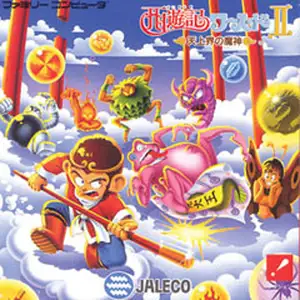
Saiyuuki World 2 - Tenjoukai no Majin
About this game
Saiyuuki World 2 - Tenjoukai no Majin is a side-scrolling action platform game developed and published by Jaleco for Famicom, released on December 7, 1990, the sequel to Saiyuuki World. Players control Sun Wukong to defeat the evil demon in celestial heaven. Inspired by Mega Man, after clearing the first stage, six element-themed stages can be tackled in any order. Defeat each stage boss to earn new weapons such as fire blasts, ice spears and shuriken blades. Collect gourds in stages to expand maximum health and potions for buffs. Levels feature underwater, volcano, temple maps filled with traps and monsters. The North American localized version is named Whomp 'Em, replacing the story and protagonist with a Native American youth while keeping all stage mechanics unchanged. It has vibrant 8-bit pixel graphics and smooth controls, a classic Journey to the West themed action title on FC.
- Release year
- 1990
- Developer
- Players
- Single player
- Supported languages
- 简体中文 · English · 日本語
FAQ
- How can I play Saiyuuki World 2 - Tenjoukai no Majin?
- You can play Saiyuuki World 2 - Tenjoukai no Majin online for free right in your browser on 8BitGo. No download or emulator installation is required.
- What platform is Saiyuuki World 2 - Tenjoukai no Majin?
- 8BitGo classifies this version as NES (Famicom). That describes how it runs here and may differ from the game's original release platform. You can play it directly in the browser.
- Can I save my progress in Saiyuuki World 2 - Tenjoukai no Majin?
- Save support depends on how this game runs. Quick saves and cloud saves are available only when the player toolbar shows a save control; otherwise use the game's own save feature.
- Does Saiyuuki World 2 - Tenjoukai no Majin work on mobile?
- It depends on the game. Check the controls on this page: games with on-screen buttons work on touch devices, while keyboard-and-mouse games are best played on desktop.
Controls
These are the default keys. Click the gamepad icon 🎮 in the player toolbar, then “Remap keys” to open the emulator’s own control settings (keyboard and gamepad, saved automatically). Gamepads are detected automatically. On phones you get on-screen buttons.
D-Pad
W S A D
A
K
B
J
Start
Enter
Select
Shift
Quick save
F2
Quick load
F4
You might also like
Same platform, same genre, or from the same developer
 ARCADE
Cisco Heat
 NES
NESDig Dug 2
 NES
NESSuper Mario Bros.
Contra
 NES
NESSuper Mario Bros.3
 NES
NESF1 Race
 NES
NESTeenage Mutant Ninja Turtles III: The Manhattan Project
 NES
NES