
Checking this game’s age requirement…
About this game
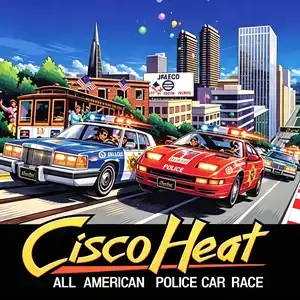
Cisco Heat, full title *Cisco Heat: All American Police Car Race*, is an arcade racing game developed and published by Jaleco, released October 1990. It was released in upright, two-player and deluxe simulator cabinet variants. Set in the hilly streets of San Francisco, players compete in a national police car steeplechase championship. Choose between two police vehicles: a Cadillac-style heavy squad car with raw power, or a Nissan 300ZX variant with superior handling. The game uses chase third-person perspective and two-speed gear shifting. Its most notable feature is sharp 90-degree corners and steep undulating hills across famous landmarks including Golden Gate Bridge and Fisherman's Wharf. Players can honk the horn to force civilian traffic such as trams and taxis out of the way. Reach checkpoints to extend the countdown timer across five race stages. Powered by multiple Motorola 68000 CPUs and Yamaha YM2151 sound chip. The original arcade version is English. It was ported to DOS, Amiga, C64 and Atari ST in 1991. The arcade ROM runs on MAME emulator, Jaleco’s urban racing competitor against Sega OutRun series.
- Release year
- 1990
- Developer
- Players
- Single player
- Supported languages
- English
FAQ
- How can I play Cisco Heat?
- You can play Cisco Heat online for free right in your browser on 8BitGo. No download or emulator installation is required.
- What platform is Cisco Heat?
- 8BitGo classifies this version as Arcade. That describes how it runs here and may differ from the game's original release platform. You can play it directly in the browser.
- Can I save my progress in Cisco Heat?
- Save support depends on how this game runs. Quick saves and cloud saves are available only when the player toolbar shows a save control; otherwise use the game's own save feature.
- Does Cisco Heat work on mobile?
- It depends on the game. Check the controls on this page: games with on-screen buttons work on touch devices, while keyboard-and-mouse games are best played on desktop.
Controls
These are the default keys. Every arcade board has a different number of buttons and means different things by them. The rows above are buttons 1–6 on the board: on Neo Geo boards (The King of Fighters and friends) A/B/C/D are buttons 1–4, Metal Slug uses only 1, 2 and 4 (shoot / jump / grenade), and Pac-Man uses none at all. Six-button fighters with three punches and three kicks (Street Fighter II and the like) get a different layout from the core: light punch U, medium punch I, heavy punch Q, light kick J, medium kick K, heavy kick E. Click the gamepad icon 🎮 in the player toolbar, then “Remap keys” to open the emulator’s own control settings (keyboard and gamepad, saved automatically). Gamepads are detected automatically. On phones you get on-screen buttons.
D-Pad
W S A D
Button 1
J
Button 2
K
Button 3
U
Button 4
I
Button 5
E
Button 6
Q
Insert coin
V
Start
Enter
Quick save
F2
Quick load
F4
You might also like
Same platform, same genre, or from the same developer
 NES
NESSaiyuuki World 2 - Tenjoukai no Majin
 ARCADE
Big Run
 ARCADE
Super Hang-On
 ARCADE
Hang-On
 ARCADE
Chase H.Q.
The King of Fighters ’97
Cadillacs and Dinosaurs
 ARCADE