
Checking this game’s age requirement…
About this game
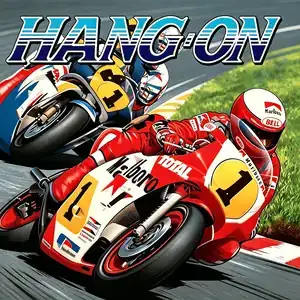
Hang-On (ハングオン) is an arcade motorcycle racing game developed by Sega AM2 under director Yu Suzuki, released July 1985. It is the groundbreaking first entry of Sega's taikan arcade series and the very first motorcycle racing game to feature a deluxe motion cabinet. Powered by the pioneering Super Scaler pseudo-3D scaling graphics technology, players straddle a full-size motorcycle replica and lean their body to steer into turns — the game title "Hang-On" refers to the racing technique of leaning into corners. The core gameplay is time-trial racing: surpass rival riders, avoid roadside obstacles and reach checkpoints to extend the countdown timer. The pseudo-3D scaled visuals create a powerful sense of speed as mountains, guardrails and vegetation rush past. The soundtrack, composed by Sega legend Hiroshi Kawaguchi, features driving electronic rock that syncs with race pacing. It was a massive commercial and critical hit, later ported to Master System, SG-1000, MSX, Commodore 64, ZX Spectrum and Amstrad CPC. It spawned the 1987 sequel Super Hang-On. The arcade ROM is playable via MAME emulator, a landmark title in arcade motion-control history and an early masterpiece by Yu Suzuki.
- Release year
- 1985
- Developer
- Players
- Single player
- Supported languages
- English
FAQ
- How can I play Hang-On?
- You can play Hang-On online for free right in your browser on 8BitGo. No download or emulator installation is required.
- What platform is Hang-On?
- 8BitGo classifies this version as Arcade. That describes how it runs here and may differ from the game's original release platform. You can play it directly in the browser.
- Can I save my progress in Hang-On?
- Save support depends on how this game runs. Quick saves and cloud saves are available only when the player toolbar shows a save control; otherwise use the game's own save feature.
- Does Hang-On work on mobile?
- It depends on the game. Check the controls on this page: games with on-screen buttons work on touch devices, while keyboard-and-mouse games are best played on desktop.
Controls
These are the default keys. Every arcade board has a different number of buttons and means different things by them. The rows above are buttons 1–6 on the board: on Neo Geo boards (The King of Fighters and friends) A/B/C/D are buttons 1–4, Metal Slug uses only 1, 2 and 4 (shoot / jump / grenade), and Pac-Man uses none at all. Six-button fighters with three punches and three kicks (Street Fighter II and the like) get a different layout from the core: light punch U, medium punch I, heavy punch Q, light kick J, medium kick K, heavy kick E. Click the gamepad icon 🎮 in the player toolbar, then “Remap keys” to open the emulator’s own control settings (keyboard and gamepad, saved automatically). Gamepads are detected automatically. On phones you get on-screen buttons.
D-Pad
W S A D
Button 1
J
Button 2
K
Button 3
U
Button 4
I
Button 5
E
Button 6
Q
Insert coin
V
Start
Enter
Quick save
F2
Quick load
F4
You might also like
Same platform, same genre, or from the same developer
 PSP
PSPHatsune Miku: Project DIVA
 ARCADE
Super Hang-On
 ARCADE
Turbo Out Run
 ARCADE
Big Run
 ARCADE
Chase H.Q.
 ARCADE