
Checking this game’s age requirement…
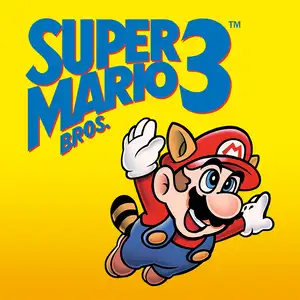
Super Mario Bros.3
About this game
Super Mario Bros.3 is a landmark 2D side-scrolling platform game developed by Nintendo’s Shigeru Miyamoto team, released for Famicom/NES in 1988. Bowser’s seven children, the Koopalings, steal magic wands from seven kingdoms across the Mushroom World and transform the kings into animals. Mario and Luigi embark on a journey through eight themed worlds, defeat bosses to recover wands, and finally storm Bowser’s castle to rescue Princess Peach. The game introduced the world map system, allowing players to pick routes, visit Toad Houses for bonus items and battle wandering Hammer Bros. Items can be stored in inventory and carried between stages. It added many iconic power-ups: the Super Leaf turns Mario into Raccoon Mario with tail attack and temporary flight, plus Frog Suit for better underwater control, Tanooki Suit and Hammer Mario suit. It features varied traps, giant-size stages and airship levels, with 2-player alternating gameplay and massive secrets. With upgraded graphics, level design and soundtrack, it profoundly influenced later 2D platform games and is widely regarded as one of the greatest games on FC.
- Release year
- 1988
- Developer
- Players
- Single player
- Supported languages
- 简体中文 · English · 日本語 · Español
FAQ
- How can I play Super Mario Bros.3?
- You can play Super Mario Bros.3 online for free right in your browser on 8BitGo. No download or emulator installation is required.
- What platform is Super Mario Bros.3?
- 8BitGo classifies this version as NES (Famicom). That describes how it runs here and may differ from the game's original release platform. You can play it directly in the browser.
- Can I save my progress in Super Mario Bros.3?
- Save support depends on how this game runs. Quick saves and cloud saves are available only when the player toolbar shows a save control; otherwise use the game's own save feature.
- Does Super Mario Bros.3 work on mobile?
- It depends on the game. Check the controls on this page: games with on-screen buttons work on touch devices, while keyboard-and-mouse games are best played on desktop.
Controls
These are the default keys. Click the gamepad icon 🎮 in the player toolbar, then “Remap keys” to open the emulator’s own control settings (keyboard and gamepad, saved automatically). Gamepads are detected automatically. On phones you get on-screen buttons.
1P
D-Pad
W S A D
A
K
B
J
Start
Enter
Select
Shift
Turbo A
I
Turbo B
U
Quick save
F2
Quick load
F4
2P
D-Pad
Numpad 8 2 4 6
A
Numpad 7
B
Numpad 9
Start
Numpad 1
Select
Numpad 3
2P uses the numeric keypad with NumLock on; a second gamepad becomes 2P automatically. No numpad? Open 🎮 → Remap keys, switch to Player 2 and pick other keys.
You might also like
Same platform, same genre, or from the same developer
 NES
Circus Charlie
 ARCADE
Double Dragon (Neo-Geo)
 ARCADE
Knights of the Round
 FLASH
THE KING OF FIGHTERS:WING
 FLASH
Gold Miner
 FLASH
cat mario
 ARCADE
Metal Slug X: Super Vehicle 001
 NES