
Checking this game’s age requirement…
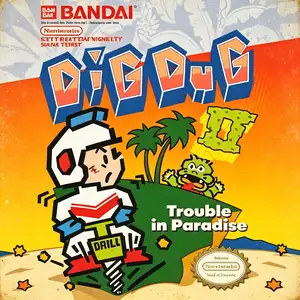
Dig Dug 2
About this game
Dig Dug 2, also known as Dig Dug II, was developed by Namco. The arcade version launched in 1985 and was ported to Famicom / NES in 1986 as the direct sequel to the original Dig Dug. Ditching the underground tunnel‑digging gameplay of its predecessor, the game takes place on ocean‑surrounded islands. Instead of digging tunnels, the protagonist shakes land sections to create cracks, sending monsters falling into the sea. Returning foes Pooka and Fygar appear alongside brand‑new enemy types. Players can inflate enemies with the air pump or shake the ground to open fissures that swallow monsters. Volcanic eruptions hurl rocks across the island as an extra hazard. Clear every enemy on the island to complete a stage, with alternating two‑player high‑score mode available. Compared with the original Dig Dug, Dig Dug 2 delivers a major shift in visuals and mechanics by removing underground digging entirely. The NES port faithfully brings over arcade content and keeps the series’ recognizable chiptune audio. Though less famous than the first title, it remains a creative Namco arcade‑to‑console port from the mid‑1980s, fully playable via modern emulators.
- Release year
- 1986
- Developer
- Players
- Single player
- Supported languages
- 简体中文 · English · 日本語
FAQ
- How can I play Dig Dug 2?
- You can play Dig Dug 2 online for free right in your browser on 8BitGo. No download or emulator installation is required.
- What platform is Dig Dug 2?
- 8BitGo classifies this version as NES (Famicom). That describes how it runs here and may differ from the game's original release platform. You can play it directly in the browser.
- Can I save my progress in Dig Dug 2?
- Save support depends on how this game runs. Quick saves and cloud saves are available only when the player toolbar shows a save control; otherwise use the game's own save feature.
- Does Dig Dug 2 work on mobile?
- It depends on the game. Check the controls on this page: games with on-screen buttons work on touch devices, while keyboard-and-mouse games are best played on desktop.
Controls
These are the default keys. Click the gamepad icon 🎮 in the player toolbar, then “Remap keys” to open the emulator’s own control settings (keyboard and gamepad, saved automatically). Gamepads are detected automatically. On phones you get on-screen buttons.
D-Pad
W S A D
A
K
B
J
Start
Enter
Select
Shift
Quick save
F2
Quick load
F4
You might also like
Same platform, same genre, or from the same developer
 NES
NESDig Dug
 GBA
GBATales of the World: Narikiri Dungeon 3
 NES
NESSaiyuuki World 2 - Tenjoukai no Majin
 NES
NESSuper Mario Bros.
Contra
 NES
NESSuper Mario Bros.3
 NES
NESF1 Race
 NES
NES