
Checking this game’s age requirement…
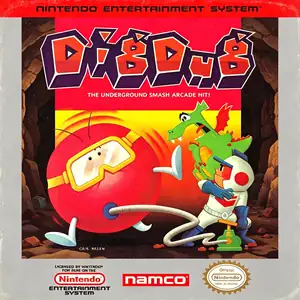
Dig Dug
About this game
Dig Dug, commonly known as Digging Kid, was developed by Namco. The arcade original released in 1982 and was ported to the Famicom / NES in 1985, serving as a famous puzzle‑action arcade port of the 1980s. Players control Dig Dug, digging tunnels through underground soil layers while fighting subterranean monsters Pooka and Fygar. You can inflate foes with an air pump until they burst, or drop overhead rocks to crush enemies. Beware of monster pursuits; some creatures are able to move through solid earth. Clear every enemy to finish the stage. Extra bonus points are awarded when monsters get crushed by falling rocks. Enemies become faster and more numerous as stages progress. Alternating two‑player mode is available for high‑score competition. The NES port faithfully reproduces core arcade gameplay with adjusted visuals, retaining catchy chiptune sound effects and tense underground action. As one of Namco’s iconic 1980s titles, Dig Dug has been re‑released in multiple retro compilations. The full game can be played on modern hardware via emulators and remains a well‑known vintage puzzle‑action classic for NES fans.
- Release year
- 1985
- Developer
- Players
- Single player
- Supported languages
- 简体中文 · English · 日本語
FAQ
- How can I play Dig Dug?
- You can play Dig Dug online for free right in your browser on 8BitGo. No download or emulator installation is required.
- What platform is Dig Dug?
- 8BitGo classifies this version as NES (Famicom). That describes how it runs here and may differ from the game's original release platform. You can play it directly in the browser.
- Can I save my progress in Dig Dug?
- Save support depends on how this game runs. Quick saves and cloud saves are available only when the player toolbar shows a save control; otherwise use the game's own save feature.
- Does Dig Dug work on mobile?
- It depends on the game. Check the controls on this page: games with on-screen buttons work on touch devices, while keyboard-and-mouse games are best played on desktop.
Controls
These are the default keys. Click the gamepad icon 🎮 in the player toolbar, then “Remap keys” to open the emulator’s own control settings (keyboard and gamepad, saved automatically). Gamepads are detected automatically. On phones you get on-screen buttons.
D-Pad
W S A D
A
K
B
J
Start
Enter
Select
Shift
Quick save
F2
Quick load
F4
You might also like
Same platform, same genre, or from the same developer
 GBA
GBATales of the World: Narikiri Dungeon 3
 NES
NESDig Dug 2
 NES
NESSuper Mario Bros.
Contra
 NES
NESSuper Mario Bros.3
 NES
NESTeenage Mutant Ninja Turtles III: The Manhattan Project
 NES
NESCircus Charlie
 NES
NES