
Checking this game’s age requirement…
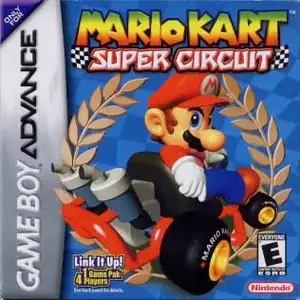
Mario Kart: Super Circuit
About this game
Mario Kart: Super Circuit is a cartoon kart racing game for Game Boy Advance, developed by Intelligent Systems and published by Nintendo in 2001. It is the third entry in the Mario Kart franchise and the first handheld Mario Kart title. Players pick from 8 racers: Mario, Luigi, Princess Peach, Yoshi, Wario, Donkey Kong, Bowser and Toad. Characters are split into light, medium and heavy weight classes which affect kart acceleration, top speed and collision resistance. It uses pseudo-3D scrolling graphics. There are 20 brand-new tracks across Mushroom Cup, Flower Cup, Lightning Cup and Star Cup. Earn gold trophies to unlock all 20 classic courses from the original Super Mario Kart on SNES. It features classic item mechanics including speed mushrooms, banana peels, red/green shells and lightning to sabotage rivals. Game modes include Grand Prix, Time Trial and balloon battle. Up to four players can compete via GBA link cable, with single-cart multiplayer support. It supports save files and ghost data exchange in time trials. With fun and accessible racing gameplay, it is an iconic classic racing game on GBA.
- Release year
- 2001
- Developer
- Players
- Single player
- Supported languages
- 简体中文 · English
FAQ
- How can I play Mario Kart: Super Circuit?
- You can play Mario Kart: Super Circuit online for free right in your browser on 8BitGo. No download or emulator installation is required.
- What platform is Mario Kart: Super Circuit?
- 8BitGo classifies this version as Game Boy Advance. That describes how it runs here and may differ from the game's original release platform. You can play it directly in the browser.
- Can I save my progress in Mario Kart: Super Circuit?
- Save support depends on how this game runs. Quick saves and cloud saves are available only when the player toolbar shows a save control; otherwise use the game's own save feature.
- Does Mario Kart: Super Circuit work on mobile?
- It depends on the game. Check the controls on this page: games with on-screen buttons work on touch devices, while keyboard-and-mouse games are best played on desktop.
Controls
These are the default keys. Click the gamepad icon 🎮 in the player toolbar, then “Remap keys” to open the emulator’s own control settings (keyboard and gamepad, saved automatically). Gamepads are detected automatically. On phones you get on-screen buttons.
D-Pad
W S A D
A
K
B
J
L
Q
R
E
Start
Enter
Select
Shift
Quick save
F2
Quick load
F4
You might also like
Same platform, same genre, or from the same developer
 NES
NESFamicom Wars
 GBA
GBAGrand Theft Auto:Advance
 GBA
GBASan Goku Shi
 GBA
GBAKirby & The Amazing Mirror
 GBA
GBAThe Legend of Zelda: The Minish Cap
 GBA
GBAThe Legend of Sword and Fairy
 GBA
GBAChobits: Atashi Dake no Hito
 GBA
GBA