
Checking this game’s age requirement…
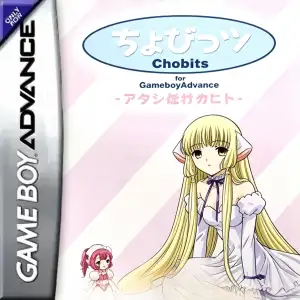
Chobits: Atashi Dake no Hito
About this game
Chobits‑Atashi Dake no Hito is a fan‑focused visual‑novel dating‑sim adventure game released for Game Boy Advance in 2002, developed and published by Marvelous. Adapted from CLAMP’s famous manga‑anime series Chobits, it was originally released only in Japan and even offered a limited‑edition GBA hardware bundle themed after Chi. Besides faithfully recreating the original worldview, it adds abundant exclusive original story segments and multiple branching endings, standing as one of the notable bishōjo text‑adventure titles on the GBA platform. Set in a near‑future city where human‑form personal computers named Persocoms are widely popular. Hideki Motosuwa, a cram‑school student who failed college entrance exams, moves to Tokyo and lives on a tight budget. One night he finds an abandoned girl‑type persocom in trash and names her Chi. When activated, Chi barely knows anything and can only utter the word “Chi”. Players take the role of Hideki and start cohabitation life with Chi. Through daily companionship and interaction, players gradually uncover Chi’s mysterious origin and solve the riddle of “the one just for me”, experiencing the delicate emotional bond between human and artificial intelligence. Core gameplay revolves arounddaily interaction and choice‑driven stat‑raising. Story unfolds via large volumes of dialogue. Player decisions modify multiple key stats including Chi’s affection, intelligence and doubt value, which determine plot branches and final endings. Daily activities include answering Chi’s questions and simple mini‑games such as morning exercises. Saving is limited to once per in‑game day, mostly available at night, and players can inspect Chi’s status after saving. High replay value is delivered through multiple play‑throughs for different outcomes. The game includes a huge gallery of CG illustrations, faithfully reproducing classic scenes from the original work alongside plenty of game‑exclusive artwork. Multiple distinct endings are available: true‑love ending, friendship ending, tragic bad ending and alternate‑romance routes. Unlocking every CG and all endings requires repeated playthroughs. Well‑known characters such as Sumomo, Chitose Hibiya and Shinbo make appearances, enriched by original side‑story content exclusive to this game. Art style faithfully follows CLAMP’s original aesthetic with delicate character sprites and gentle background music matching the warm‑melancholy tone of Chobits. There are no combat or platforming segments; gameplay focuses purely on text reading and emotional decision‑making. Fan‑made Chinese translation patches exist for this Japan‑only release. It runs smoothly via modern GBA emulators on PC and mobile devices, serving as a precious vintage licensed manga‑adapted visual‑novel for retro‑game and Chobits fans.
- Release year
- 2002
- Developer
- Players
- Single player
- Supported languages
- 简体中文 · English · 日本語
FAQ
- How can I play Chobits: Atashi Dake no Hito?
- You can play Chobits: Atashi Dake no Hito online for free right in your browser on 8BitGo. No download or emulator installation is required.
- What platform is Chobits: Atashi Dake no Hito?
- 8BitGo classifies this version as Game Boy Advance. That describes how it runs here and may differ from the game's original release platform. You can play it directly in the browser.
- Can I save my progress in Chobits: Atashi Dake no Hito?
- Save support depends on how this game runs. Quick saves and cloud saves are available only when the player toolbar shows a save control; otherwise use the game's own save feature.
- Does Chobits: Atashi Dake no Hito work on mobile?
- It depends on the game. Check the controls on this page: games with on-screen buttons work on touch devices, while keyboard-and-mouse games are best played on desktop.
Controls
These are the default keys. Click the gamepad icon 🎮 in the player toolbar, then “Remap keys” to open the emulator’s own control settings (keyboard and gamepad, saved automatically). Gamepads are detected automatically. On phones you get on-screen buttons.
D-Pad
W S A D
A
K
B
J
L
Q
R
E
Start
Enter
Select
Shift
Quick save
F2
Quick load
F4
You might also like
Same platform, same genre, or from the same developer
 GBA
GBAHarvest Moon: Friends of Mineral Town (Girl Version)
 GBA
GBAHarvest Moon: Friends of Mineral Town
 GBA
GBAGrand Theft Auto:Advance
 GBA
GBASan Goku Shi
 GBA
GBAKirby & The Amazing Mirror
 GBA
GBAThe Legend of Zelda: The Minish Cap
 GBA
GBAThe Legend of Sword and Fairy
 GBA
GBA