
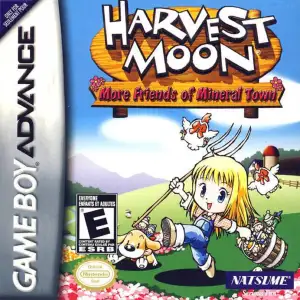
Checking this game’s age requirement…
Harvest Moon: Friends of Mineral Town (Girl Version)
About this game
Harvest Moon: More Friends of Mineral Town (For Girl) is a classic cozy farming simulation game released for GBA in 2003. It is the enhanced female-exclusive version of Harvest Moon: Friends of Mineral Town, remade and optimized from the NGC classic Harvest Moon: Back to Nature. While retaining all core farming, seasonal cycle and town-life gameplay, this girl version adds massive exclusive features, unique events, quality-of-life improvements and rare collectibles, making it one of the most polished and relaxing vintage simulation games on GBA. Players control the female protagonist Claire, who leaves city life behind to restore her grandfather’s abandoned farm in Mineral Town. The game features complete day-night rotation, dynamic weather and four-season cycle with diverse seasonal festivals. With no rigid main quests or completion pressure, it delivers pure free-style rural sandbox experience focused on farming, raising livestock, fishing, mining and home customization. This exclusive girl edition comes with unique upgraded mechanics not available in the boy version. Players can purchase a mirror to unlock multiple outfits and change clothes daily to boost villager and lover affection. A fish pond breeding system allows players to raise collected fish in the farm pool. The female character has lower fatigue consumption and better stamina efficiency for smoother farm work. It includes more cooking recipes, independent dish-selling functions and more trading options for higher economic flexibility. It features an expanded romance and social system with seven eligible bachelor characters, including Doctor, Gray, Rick, Kai, Cliff, Gourmet and Kappa, offering more romance routes than the original version. The exclusive seven-ring collection system is unlocked through special festival events such as Star Night Festival, providing unique collectibles and high replay value. Affection growth speed is optimized, and post-marriage life details including pregnancy and family daily interactions are more delicate and immersive. The girl version contains exclusive quality-of-life optimizations. The mountain villa purchase price is drastically reduced from 100 million G to 10 million G, greatly lowering the end-game threshold. It adds exclusive NPC dialogues, seasonal easter eggs, random events and limited items. Classic contents such as dwarf helpers, hot spring recovery and festival minigames are fully preserved, creating a more user-friendly and richer rural simulation experience. With cozy retro pixel graphics and soothing pastoral background music, the game provides pure relaxing gameplay without pay-to-win mechanics. Fully compatible with modern GBA emulators on PC and mobile devices, Harvest Moon: More Friends of Mineral Town remains the best refined female-oriented farming classic for vintage simulation game enthusiasts.
- Release year
- 2003
- Developer
- Players
- Single player
- Supported languages
- 简体中文 · English · 日本語 · Deutsch
FAQ
- How can I play Harvest Moon: Friends of Mineral Town (Girl Version)?
- You can play Harvest Moon: Friends of Mineral Town (Girl Version) online for free right in your browser on 8BitGo. No download or emulator installation is required.
- What platform is Harvest Moon: Friends of Mineral Town (Girl Version)?
- 8BitGo classifies this version as Game Boy Advance. That describes how it runs here and may differ from the game's original release platform. You can play it directly in the browser.
- Can I save my progress in Harvest Moon: Friends of Mineral Town (Girl Version)?
- Save support depends on how this game runs. Quick saves and cloud saves are available only when the player toolbar shows a save control; otherwise use the game's own save feature.
- Does Harvest Moon: Friends of Mineral Town (Girl Version) work on mobile?
- It depends on the game. Check the controls on this page: games with on-screen buttons work on touch devices, while keyboard-and-mouse games are best played on desktop.
Controls
These are the default keys. Click the gamepad icon 🎮 in the player toolbar, then “Remap keys” to open the emulator’s own control settings (keyboard and gamepad, saved automatically). Gamepads are detected automatically. On phones you get on-screen buttons.
D-Pad
W S A D
A
K
B
J
L
Q
R
E
Start
Enter
Select
Shift
Quick save
F2
Quick load
F4
You might also like
Same platform, same genre, or from the same developer
 GBA
GBAChobits: Atashi Dake no Hito
 GBA
GBAHarvest Moon: Friends of Mineral Town
 GBA
GBAGrand Theft Auto:Advance
 GBA
GBASan Goku Shi
 GBA
GBAKirby & The Amazing Mirror
 GBA
GBAThe Legend of Zelda: The Minish Cap
 GBA
GBAThe Legend of Sword and Fairy
 GBA
GBA