
Checking this game’s age requirement…
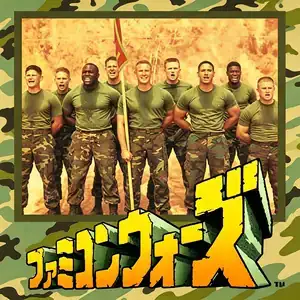
Famicom Wars
About this game
Famicom Wars, known among Chinese retro players as Nintendo Wars, is a turn-based strategy game developed by Intelligent Systems and published by Nintendo, released exclusively in Japan for Famicom in 1988. It is the original debut title of the Nintendo Wars franchise, the predecessor of Advance Wars, and an early landmark work from Intelligent Systems. Its development experience greatly influenced the later Fire Emblem series. Players command the Red Star or Blue Moon army on grid-based battlefields. The core gameplay: capture cities to earn funds, produce military units including infantry, mechs, tanks, fighters and battleships at factories. Different unit types have strength and weakness counters. Terrain such as mountains, forests and water affects movement cost and defense values. You win by capturing the enemy headquarters or wiping out all enemy forces. The campaign includes 15 main maps plus 2 bonus unlockable stages after clearing the game. There is no unit leveling system; battle outcomes are predictable, focusing on careful tactical planning. Two-player versus mode is available. It never received an official overseas release, though fan translation patches were created later. This streamlined modern wargame formula established the foundation for Advance Wars on GBA, making it an iconic SLG on the Famicom platform.
- Release year
- 1988
- Developer
- Players
- Single player
- Supported languages
- 简体中文 · English · 日本語
FAQ
- How can I play Famicom Wars?
- You can play Famicom Wars online for free right in your browser on 8BitGo. No download or emulator installation is required.
- What platform is Famicom Wars?
- 8BitGo classifies this version as NES (Famicom). That describes how it runs here and may differ from the game's original release platform. You can play it directly in the browser.
- Can I save my progress in Famicom Wars?
- Save support depends on how this game runs. Quick saves and cloud saves are available only when the player toolbar shows a save control; otherwise use the game's own save feature.
- Does Famicom Wars work on mobile?
- It depends on the game. Check the controls on this page: games with on-screen buttons work on touch devices, while keyboard-and-mouse games are best played on desktop.
Controls
These are the default keys. Click the gamepad icon 🎮 in the player toolbar, then “Remap keys” to open the emulator’s own control settings (keyboard and gamepad, saved automatically). Gamepads are detected automatically. On phones you get on-screen buttons.
1P
D-Pad
W S A D
A
K
B
J
Start
Enter
Select
Shift
Turbo A
I
Turbo B
U
Quick save
F2
Quick load
F4
2P
D-Pad
Numpad 8 2 4 6
A
Numpad 7
B
Numpad 9
Start
Numpad 1
Select
Numpad 3
2P uses the numeric keypad with NumLock on; a second gamepad becomes 2P automatically. No numpad? Open 🎮 → Remap keys, switch to Player 2 and pick other keys.
You might also like
Same platform, same genre, or from the same developer
 GBA
Mario Kart: Super Circuit
 GBA
Advance Wars 2: Black Hole Rising
 GBA
Advance Wars
 GBA
Fire Emblem: The Binding Blade
 GBA
Fire Emblem: The Sacred Stones
 NES
Fire Emblem Gaiden
 NES
Fire Emblem: Shadow Dragon and the Blade of Light
 NES