
Comprobando el requisito de edad de este juego…
Hang-On
Sobre este juego
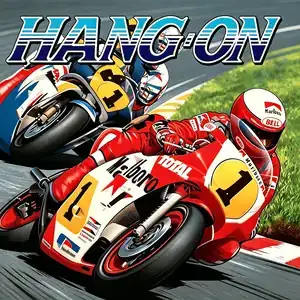
Hang-On (ハングオン) is an arcade motorcycle racing game developed by Sega AM2 under director Yu Suzuki, released July 1985. It is the groundbreaking first entry of Sega's taikan arcade series and the very first motorcycle racing game to feature a deluxe motion cabinet. Powered by the pioneering Super Scaler pseudo-3D scaling graphics technology, players straddle a full-size motorcycle replica and lean their body to steer into turns — the game title "Hang-On" refers to the racing technique of leaning into corners. The core gameplay is time-trial racing: surpass rival riders, avoid roadside obstacles and reach checkpoints to extend the countdown timer. The pseudo-3D scaled visuals create a powerful sense of speed as mountains, guardrails and vegetation rush past. The soundtrack, composed by Sega legend Hiroshi Kawaguchi, features driving electronic rock that syncs with race pacing. It was a massive commercial and critical hit, later ported to Master System, SG-1000, MSX, Commodore 64, ZX Spectrum and Amstrad CPC. It spawned the 1987 sequel Super Hang-On. The arcade ROM is playable via MAME emulator, a landmark title in arcade motion-control history and an early masterpiece by Yu Suzuki.
- Año de lanzamiento
- 1985
- Desarrolladora
- Jugadores
- 1 jugador
- Idiomas compatibles
- English
Preguntas frecuentes
- ¿Cómo puedo jugar a Hang-On?
- Puedes jugar a Hang-On en línea y gratis directamente en tu navegador en 8BitGo. No necesitas descargar nada ni instalar ningún emulador.
- ¿En qué plataforma es Hang-On?
- 8BitGo clasifica esta versión como Arcade. Esto describe cómo se ejecuta aquí y puede diferir de la plataforma de lanzamiento original. Puedes jugar directamente en el navegador.
- ¿Puedo guardar mi progreso en Hang-On?
- La posibilidad de guardar depende de cómo se ejecute el juego. El guardado rápido y en la nube solo está disponible si la barra del reproductor muestra un control de guardado; si no, usa el guardado propio del juego.
- ¿Funciona Hang-On en el móvil?
- Depende del juego. Consulta los controles de esta página: los juegos con botones en pantalla funcionan con tacto, mientras que los de teclado y ratón se disfrutan mejor en un ordenador.
Controles
Estas son las teclas predeterminadas. Cada placa recreativa tiene un número de botones distinto y les da un sentido distinto. Arriba están los botones 1 a 6 de la placa: en Neo Geo (The King of Fighters y compañía) A/B/C/D son los botones 1 a 4, Metal Slug solo usa 1, 2 y 4 (disparo / salto / granada), y Pac-Man no usa ninguno. Los juegos de lucha de seis botones con tres puños y tres patadas (Street Fighter II, por ejemplo) reciben otra disposición del núcleo: puño flojo U, puño medio I, puño fuerte Q, patada floja J, patada media K, patada fuerte E. Haz clic en el icono de mando 🎮 de la barra del reproductor y luego en «Reasignar teclas» para abrir la configuración de controles del emulador (teclado y mando, se guarda automáticamente). Si conectas un mando, se detecta solo. En el teléfono aparecen botones en pantalla.
Cruceta
W S A D
Botón 1
J
Botón 2
K
Botón 3
U
Botón 4
I
Botón 5
E
Botón 6
Q
Insertar moneda
V
Start
Enter
Guardado rápido
F2
Carga rápida
F4
También te puede gustar
Misma plataforma, mismo género o de la misma desarrolladora
 PSP
PSPHatsune Miku: Project DIVA
 ARCADE
Super Hang-On
 ARCADE
Turbo Out Run
 ARCADE
Big Run
 ARCADE
Chase H.Q.
 ARCADE