
Comprobando el requisito de edad de este juego…
Sobre este juego
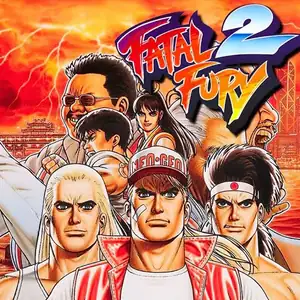
Fatal Fury 2 (Japanese: Garou Densetsu 2: Arata‑Naru Tatakai) is SNK’s 2D fighting arcade title released December 10,1992 for Neo‑Geo MVS hardware, the direct sequel to the original Fatal Fury. It marks the debut of iconic characters Mai Shiranui and Kim Kaphwan, and laid the foundation for Fatal Fury Special. The story follows Terry, Andy and Joe as they enter a tournament hosted by Wolfgang Krauser, Geese Howard’s powerful half‑brother who seizes control of South Town after Geese fakes his death. It refines the signature two‑plane battle system for foreground‑background evasion. The control scheme shifts from 3‑button to 4‑button light/heavy punch‑kick layout, and introduces the legendary Desperation Move: high‑damage reversal specials usable only when health flashes red. Eight playable fighters are available, with a boss ladder including Billy Kane, Axel Hawk, Lawrence Blood and final boss Wolfgang Krauser. Enhanced sprite art, animations and soundtrack. Widely ported to home consoles, playable via MAME arcade emulators.
- Año de lanzamiento
- 1992
- Desarrolladora
- Jugadores
- 2 jugadores
- Idiomas compatibles
- English
Preguntas frecuentes
- ¿Cómo puedo jugar a Fatal Fury 2?
- Puedes jugar a Fatal Fury 2 en línea y gratis directamente en tu navegador en 8BitGo. No necesitas descargar nada ni instalar ningún emulador.
- ¿En qué plataforma es Fatal Fury 2?
- 8BitGo clasifica esta versión como Arcade. Esto describe cómo se ejecuta aquí y puede diferir de la plataforma de lanzamiento original. Puedes jugar directamente en el navegador.
- ¿Puedo guardar mi progreso en Fatal Fury 2?
- La posibilidad de guardar depende de cómo se ejecute el juego. El guardado rápido y en la nube solo está disponible si la barra del reproductor muestra un control de guardado; si no, usa el guardado propio del juego.
- ¿Funciona Fatal Fury 2 en el móvil?
- Depende del juego. Consulta los controles de esta página: los juegos con botones en pantalla funcionan con tacto, mientras que los de teclado y ratón se disfrutan mejor en un ordenador.
Controles
Estas son las teclas predeterminadas. Cada placa recreativa tiene un número de botones distinto y les da un sentido distinto. Arriba están los botones 1 a 6 de la placa: en Neo Geo (The King of Fighters y compañía) A/B/C/D son los botones 1 a 4, Metal Slug solo usa 1, 2 y 4 (disparo / salto / granada), y Pac-Man no usa ninguno. Los juegos de lucha de seis botones con tres puños y tres patadas (Street Fighter II, por ejemplo) reciben otra disposición del núcleo: puño flojo U, puño medio I, puño fuerte Q, patada floja J, patada media K, patada fuerte E. Haz clic en el icono de mando 🎮 de la barra del reproductor y luego en «Reasignar teclas» para abrir la configuración de controles del emulador (teclado y mando, se guarda automáticamente). Si conectas un mando, se detecta solo. En el teléfono aparecen botones en pantalla.
Cruceta
W S A D
Botón 1
J
Botón 2
K
Botón 3
U
Botón 4
I
Botón 5
E
Botón 6
Q
Insertar moneda
V
Start
Enter
Guardado rápido
F2
Carga rápida
F4
También te puede gustar
Misma plataforma, mismo género o de la misma desarrolladora
The King of Fighters ’97
 ARCADE
King Of Fighters 2002
 ARCADE
Metal Slug 3
 ARCADE
The King of Fighters ’98
 ARCADE
Metal Slug: Super Vehicle-001
 ARCADE
The King of Fighters 2000
 ARCADE
The King of Fighters 2001
 ARCADE