
Comprobando el requisito de edad de este juego…
Sobre este juego
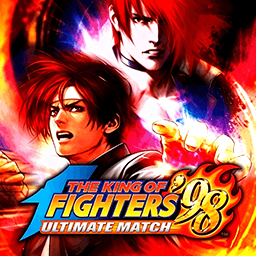
**The King of Fighters ’98: Dream Match Never Ends** is a legendary 2D fighting game released by SNK for Neo‑Geo arcade hardware in 1998. As a comprehensive compilation title of the Orochi saga, it is widely regarded as one of the greatest competitive fighting games for its outstanding character balance株式会社S.... This is a story‑free dream‑match crossover. It brings together fan‑favorite fighters from KOF 94 to KOF 97, including Kyo Kusanagi, Iori Yagami, Mai Shiranui and many more. Players assemble a three‑character team under the classic 3‑on‑3 team battle rule, set fight order freely, and compete by mastering combos and meter management. Omega Rugal serves as the final boss after clearing arcade mode. Two distinct gameplay systems are available, ADVANCED Mode and EXTRA Mode, with unique gauge building and evasion mechanics for varied playstyles. Compared with KOF 97, this entry fixes overpowered combos and glitches for fairer competitive matches, featuring a huge roster with alternate versions and secret unlockable fighters. An enhanced remastered version, **KOF 98 Ultimate Match**, expands playable characters and rebalances the whole cast. Up to now, The King of Fighters ’98 remains a staple retro fighting game for arcade emulators and offline tournaments.
- Año de lanzamiento
- 1998
- Desarrolladora
- Jugadores
- 2 jugadores
- Idiomas compatibles
- English
Preguntas frecuentes
- ¿Cómo puedo jugar a The King of Fighters ’98?
- Puedes jugar a The King of Fighters ’98 en línea y gratis directamente en tu navegador en 8BitGo. No necesitas descargar nada ni instalar ningún emulador.
- ¿En qué plataforma es The King of Fighters ’98?
- 8BitGo clasifica esta versión como Arcade. Esto describe cómo se ejecuta aquí y puede diferir de la plataforma de lanzamiento original. Puedes jugar directamente en el navegador.
- ¿Puedo guardar mi progreso en The King of Fighters ’98?
- La posibilidad de guardar depende de cómo se ejecute el juego. El guardado rápido y en la nube solo está disponible si la barra del reproductor muestra un control de guardado; si no, usa el guardado propio del juego.
- ¿Funciona The King of Fighters ’98 en el móvil?
- Depende del juego. Consulta los controles de esta página: los juegos con botones en pantalla funcionan con tacto, mientras que los de teclado y ratón se disfrutan mejor en un ordenador.
Controles
Estas son las teclas predeterminadas. Cada placa recreativa tiene un número de botones distinto y les da un sentido distinto. Arriba están los botones 1 a 6 de la placa: en Neo Geo (The King of Fighters y compañía) A/B/C/D son los botones 1 a 4, Metal Slug solo usa 1, 2 y 4 (disparo / salto / granada), y Pac-Man no usa ninguno. Los juegos de lucha de seis botones con tres puños y tres patadas (Street Fighter II, por ejemplo) reciben otra disposición del núcleo: puño flojo U, puño medio I, puño fuerte Q, patada floja J, patada media K, patada fuerte E. Haz clic en el icono de mando 🎮 de la barra del reproductor y luego en «Reasignar teclas» para abrir la configuración de controles del emulador (teclado y mando, se guarda automáticamente). Si conectas un mando, se detecta solo. En el teléfono aparecen botones en pantalla.
Cruceta
W S A D
Botón 1
J
Botón 2
K
Botón 3
U
Botón 4
I
Botón 5
E
Botón 6
Q
Insertar moneda
V
Start
Enter
Guardado rápido
F2
Carga rápida
F4
También te puede gustar
Misma plataforma, mismo género o de la misma desarrolladora
The King of Fighters ’97
 ARCADE
King Of Fighters 2002
 ARCADE
Metal Slug 3
 ARCADE
Metal Slug: Super Vehicle-001
 ARCADE
The King of Fighters 2000
 ARCADE
The King of Fighters 2001
 ARCADE
The King of Fighters 2003
 ARCADE