
Checking this game’s age requirement…
About this game
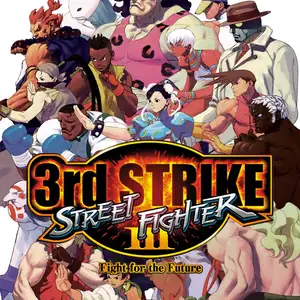
Street Fighter III: 3rd Strike - Fight for the Future (commonly shortened to 3rd Strike or SF3.3) is an arcade fighting game released by Capcom in 1999. It is the final entry of the Street Fighter III trilogy and runs on the CP System III arcade board. Five new fighters were added: Chun-Li, Makoto, Remy, Q and Twelve, expanding the total playable roster to 20 characters. Shin Akuma from the previous version was removed. The game retains the franchise’s famous Parry system and introduces the new Guard Parry (Red Parry), allowing players to parry incoming attacks even during block stun. It keeps core mechanics including selectable Super Arts, EX special moves and tech throws. A post-match grading system evaluates players on offense, defense and technical skill. The classic car-destroying bonus stage also returns, with extensive rebalancing of move frames and character performance. The hand-drawn CPS3 sprite animations remain widely regarded as the peak of 2D fighting game visuals. This title gave birth to the legendary EVO Moment 37, the famous Daigo Umehara parry comeback. Though sales were modest at launch, it earned a massive competitive fanbase due to its deep gameplay and is still featured in fighting game tournaments. It was later ported to Dreamcast, PS2 and Xbox, received an Online Edition, and was included in the Street Fighter 30th Anniversary Collection, standing as a legendary title among hardcore fighting game fans.
- Release year
- 1990
- Developer
- Players
- Single player
- Supported languages
- English
FAQ
- How can I play Street Fighter III: 3rd Strike - Fight for the Future?
- You can play Street Fighter III: 3rd Strike - Fight for the Future online for free right in your browser on 8BitGo. No download or emulator installation is required.
- What platform is Street Fighter III: 3rd Strike - Fight for the Future?
- 8BitGo classifies this version as Arcade. That describes how it runs here and may differ from the game's original release platform. You can play it directly in the browser.
- Can I save my progress in Street Fighter III: 3rd Strike - Fight for the Future?
- Save support depends on how this game runs. Quick saves and cloud saves are available only when the player toolbar shows a save control; otherwise use the game's own save feature.
- Does Street Fighter III: 3rd Strike - Fight for the Future work on mobile?
- It depends on the game. Check the controls on this page: games with on-screen buttons work on touch devices, while keyboard-and-mouse games are best played on desktop.
Controls
These are the default keys. Every arcade board has a different number of buttons and means different things by them. The rows above are buttons 1–6 on the board: on Neo Geo boards (The King of Fighters and friends) A/B/C/D are buttons 1–4, Metal Slug uses only 1, 2 and 4 (shoot / jump / grenade), and Pac-Man uses none at all. Six-button fighters with three punches and three kicks (Street Fighter II and the like) get a different layout from the core: light punch U, medium punch I, heavy punch Q, light kick J, medium kick K, heavy kick E. Click the gamepad icon 🎮 in the player toolbar, then “Remap keys” to open the emulator’s own control settings (keyboard and gamepad, saved automatically). Gamepads are detected automatically. On phones you get on-screen buttons.
D-Pad
W S A D
Button 1
J
Button 2
K
Button 3
U
Button 4
I
Button 5
E
Button 6
Q
Insert coin
V
Start
Enter
Quick save
F2
Quick load
F4
You might also like
Same platform, same genre, or from the same developer
 DOS
DOSAge of Empires
 NES
NESSuper Mario Bros.3
 NDS
NDSPlants vs. Zombies
 NES
NESCircus Charlie
 NES
NESGomoku Narabe Renju
 NDS
NDSGrand Theft Auto: Chinatown Wars
 GBA
GBAThe King of Fighters EX: Neo Blood
 ARCADE