
Checking this game’s age requirement…
Plants vs. Zombies
About this game
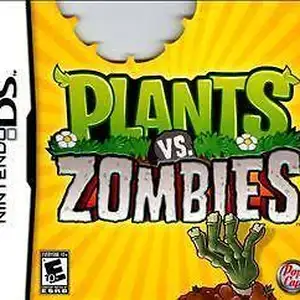
Plants vs. Zombies for Nintendo DS is a tower defense game developed by PopCap, released on January 18, 2011 in North America. It is the handheld port of the iconic Plants vs. Zombies. Players use the stylus to plant Peashooters, Wall-nuts, Cherry Bombs and other plants to defend the backyard from humorous zombies trying to eat your brains. It retains all core PC content including Adventure, Puzzle, Survival modes, Zen Garden and the Tree of Wisdom. This DS version adds local wireless Versus multiplayer, where two players fight each other as plants and zombies. It also features four exclusive minigames: Air Raid, Home Run Derby, Heat Wave and Bomb All Together, plus the new Trash Can Zombie and 14 unique achievements. It uses DS dual-screen layout: top screen displays the battlefield while the bottom screen handles plant card selection. It is slightly harder than PC version with a maximum of 9 seed slots. A cut-down DSiWare digital edition exists. Fan Chinese translation patch is available. It is a popular casual tower defense title on NDS.
- Release year
- 1990
- Developer
- Players
- Single player
- Supported languages
- FR
FAQ
- How can I play Plants vs. Zombies?
- You can play Plants vs. Zombies online for free right in your browser on 8BitGo. No download or emulator installation is required.
- What platform is Plants vs. Zombies?
- The original release of Plants vs. Zombies was for the Nintendo DS platform. On 8BitGo you play it directly in the browser with no extra setup.
- Can I save my progress in Plants vs. Zombies?
- Yes. Most emulators on 8BitGo support save states, and signing in lets you sync supported saves to the cloud.
- Does Plants vs. Zombies work on mobile?
- Yes. 8BitGo adapts to touch devices, with on-screen controls or Bluetooth gamepad support.
Controls
These are the default keys. Click the gamepad icon 🎮 in the player toolbar, then “Remap keys” to open the emulator’s own control settings (keyboard and gamepad, saved automatically). Gamepads are detected automatically. On phones you get on-screen buttons.
D-Pad
W S A D
A
K
B
J
X
I
Y
U
L
Q
R
E
Start
Enter
Select
Shift
Quick save
F2
Quick load
F4
You might also like
Same platform, same genre, or from the same developer
 NES
NESGomoku Narabe Renju
 HTML5
HTML5Taiko no Tatsujin:Web
 NES
NESSuper Mario Bros.3
 FLASH
FLASHGold Miner
 FLASH
FLASHFireboy & Watergirl 4: In the Crystal Temple
 FLASH
FLASHFireboy & Watergirl 3: In the Ice Temple
 NDS
NDSPokémon SoulSilver
 NDS
NDS