Checking this game’s age requirement…
Gomoku Narabe Renju
About this game
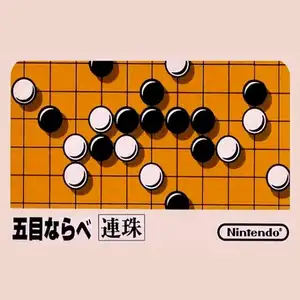
Gomoku (known as Five in a Row for Chinese retro players, Japanese: Gomoku Narabe) is a classic board game title on the Famicom. The most famous version is the official Nintendo Gomoku game. Based on traditional Japanese five-in-a-row rules, black and white players place stones in turns. The first player to connect five stones in a row horizontally, vertically or diagonally wins. It supports human vs AI and two-player local versus modes. Multiple AI difficulty tiers are available. Easy AI plays cautiously, while hard AI excels at defense, threats and double-three attacks, great for learning basic gomoku tactics. The UI is simple with a standard 15×15 board. You move the cursor to drop stones, and an undo function supports reviewing moves. Lacking flashy visuals, it focuses entirely on turn-based board strategy. Included on many Subor multicarts in China, it introduced countless players to Gomoku. It is one of the few pure puzzle & board games on the Famicom.
- Release year
- 1983
- Developer
- Players
- 2 players
- Supported languages
- 简体中文 · English · 日本語
FAQ
- How can I play Gomoku Narabe Renju?
- You can play Gomoku Narabe Renju online for free right in your browser on 8BitGo. No download or emulator installation is required.
- What platform is Gomoku Narabe Renju?
- 8BitGo classifies this version as NES (Famicom). That describes how it runs here and may differ from the game's original release platform. You can play it directly in the browser.
- Can I save my progress in Gomoku Narabe Renju?
- Save support depends on how this game runs. Quick saves and cloud saves are available only when the player toolbar shows a save control; otherwise use the game's own save feature.
- Does Gomoku Narabe Renju work on mobile?
- It depends on the game. Check the controls on this page: games with on-screen buttons work on touch devices, while keyboard-and-mouse games are best played on desktop.
Controls
These are the default keys. Click the gamepad icon 🎮 in the player toolbar, then “Remap keys” to open the emulator’s own control settings (keyboard and gamepad, saved automatically). Gamepads are detected automatically. On phones you get on-screen buttons.
1P
D-Pad
W S A D
A
K
B
J
Start
Enter
Select
Shift
Turbo A
I
Turbo B
U
Quick save
F2
Quick load
F4
2P
D-Pad
Numpad 8 2 4 6
A
Numpad 7
B
Numpad 9
Start
Numpad 1
Select
Numpad 3
2P uses the numeric keypad with NumLock on; a second gamepad becomes 2P automatically. No numpad? Open 🎮 → Remap keys, switch to Player 2 and pick other keys.
You might also like
Same platform, same genre, or from the same developer