Checking this game’s age requirement…
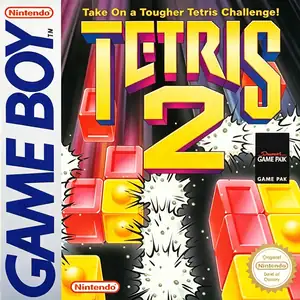
Tetris 2
About this game
Tetris 2 (released in Japan as Tetris Flash) is a puzzle game developed and published by Nintendo. It launched on Game Boy in 1993, with ports for NES and SNES. Instead of clearing full horizontal lines like the original Tetris, it reworks the core rules with color matching mechanics. Falling pieces consist of multi-colored segments. Players can clear blocks by lining up three same-colored segments horizontally or vertically. The objective of each stage is to eliminate all flashing bomb blocks on the playfield. The game features two main modes: challenge mode and puzzle mode. Puzzle mode gives pre-set block layouts, requiring players to discover chain-clearing solutions. It introduces new disjoint tetromino shapes where segments are not connected, adding fresh strategic layers. It supports two-player competitive battles via the Game Boy link cable, sending garbage blocks to disrupt opponents. It also works with the Super Game Boy hardware for color display. As a bold reimagining of the Tetris formula, it blends falling block gameplay with color matching puzzles, standing out as a distinctive puzzle title for the Game Boy.
- Release year
- 1993
- Developer
- Players
- Single player
- Supported languages
- English
FAQ
- How can I play Tetris 2?
- You can play Tetris 2 online for free right in your browser on 8BitGo. No download or emulator installation is required.
- What platform is Tetris 2?
- 8BitGo classifies this version as Game Boy. That describes how it runs here and may differ from the game's original release platform. You can play it directly in the browser.
- Can I save my progress in Tetris 2?
- Save support depends on how this game runs. Quick saves and cloud saves are available only when the player toolbar shows a save control; otherwise use the game's own save feature.
- Does Tetris 2 work on mobile?
- It depends on the game. Check the controls on this page: games with on-screen buttons work on touch devices, while keyboard-and-mouse games are best played on desktop.
Controls
These are the default keys. Click the gamepad icon 🎮 in the player toolbar, then “Remap keys” to open the emulator’s own control settings (keyboard and gamepad, saved automatically). Gamepads are detected automatically. On phones you get on-screen buttons.
D-Pad
W S A D
A
K
B
J
Start
Enter
Select
Shift
Quick save
F2
Quick load
F4
You might also like
Same platform, same genre, or from the same developer