
Checking this game’s age requirement…
Samurai Shodown V
About this game
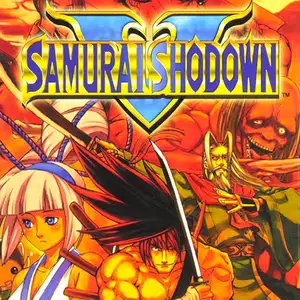
Samurai Shodown V (Japanese title Samurai Spirits Zero) is a weapon-based 2D fighting game developed by Yuki Enterprise and published by SNK Playmore. It released for Neo Geo MVS arcade hardware on October 10, 2003. It is a prequel set two years before the original Samurai Shodown and one of the final major fighting releases for the Neo Geo platform. Set during the Tenmei era, famine and volcanic disasters ravage Japan. The Tokugawa shogunate fails to relieve suffering civilians. Gaoh Kyougoku Hinowanokami, a former shogun retainer, raises a rebellion to overthrow the corrupt government. Warriors, ninjas and priestesses journey into the chaos to fight for their beliefs. Tokugawa Yoshitora serves as the main protagonist. The game removes the Shura/Rasetsu (Slash/Bust) dual style system from Samurai Shodown III and IV. Every character has a single unified moveset, returning to the classic spacing-focused, high-damage single strike gameplay of Samurai Shodown II. Two brand-new core mechanics are introduced: the **Sword Gauge** and **Concentration One (meditation state)**. Sword gauge depletes when swinging your blade and regenerates passively while not attacking; higher gauge greatly boosts slash damage. Hold the D button to enter Concentration One, triggering slow-motion for precise reads against opponents. The classic Rage Gauge, Rage Explosion and Fatal Flash are retained from Samurai Shodown IV. The roster totals 24 fighters. Four new characters join: Tokugawa Yoshitora, Majikina Mina, Liu Yunfei and Sankuro. Returning veterans include Haohmaru, Nakoruru, Ukyo Tachibana, Genjuro Kibagami, Hattori Hanzo and Shizumaru Hisame. Matches follow best-of-three rules. Blade clashes and weapon-knockout mechanics remain. Long 14-hit combos are removed, de-emphasizing combo gameplay and emphasizing punishing heavy sword strikes. It features bright hand-drawn pixel art, fluid sprite animations and somber atmospheric soundtrack. Developed by external studio Yuki Enterprise, some assets are reused and the original release removed blood effects. It was not widely seen in domestic Chinese arcades. As one of the last great Neo Geo fighters, it preserves the franchise’s sword-fighting spirit and maintains a dedicated retro fighting fanbase. An enhanced upgraded version, Samurai Shodown V Special, followed one year later.
- Release year
- 1990
- Developer
- Players
- 2 players
- Supported languages
- English
FAQ
- How can I play Samurai Shodown V?
- You can play Samurai Shodown V online for free right in your browser on 8BitGo. No download or emulator installation is required.
- What platform is Samurai Shodown V?
- 8BitGo classifies this version as Arcade. That describes how it runs here and may differ from the game's original release platform. You can play it directly in the browser.
- Can I save my progress in Samurai Shodown V?
- Save support depends on how this game runs. Quick saves and cloud saves are available only when the player toolbar shows a save control; otherwise use the game's own save feature.
- Does Samurai Shodown V work on mobile?
- It depends on the game. Check the controls on this page: games with on-screen buttons work on touch devices, while keyboard-and-mouse games are best played on desktop.
Controls
These are the default keys. Every arcade board has a different number of buttons and means different things by them. The rows above are buttons 1–6 on the board: on Neo Geo boards (The King of Fighters and friends) A/B/C/D are buttons 1–4, Metal Slug uses only 1, 2 and 4 (shoot / jump / grenade), and Pac-Man uses none at all. Six-button fighters with three punches and three kicks (Street Fighter II and the like) get a different layout from the core: light punch U, medium punch I, heavy punch Q, light kick J, medium kick K, heavy kick E. Click the gamepad icon 🎮 in the player toolbar, then “Remap keys” to open the emulator’s own control settings (keyboard and gamepad, saved automatically). Gamepads are detected automatically. On phones you get on-screen buttons.
D-Pad
W S A D
Button 1
J
Button 2
K
Button 3
U
Button 4
I
Button 5
E
Button 6
Q
Insert coin
V
Start
Enter
Quick save
F2
Quick load
F4
You might also like
Same platform, same genre, or from the same developer
 DOS
DOSAge of Empires
 NES
NESSuper Mario Bros.3
 NDS
NDSPlants vs. Zombies
 NES
NESCircus Charlie
 NES
NESGomoku Narabe Renju
 NDS
NDSGrand Theft Auto: Chinatown Wars
 GBA
GBAThe King of Fighters EX: Neo Blood
 ARCADE