
Checking this game’s age requirement…
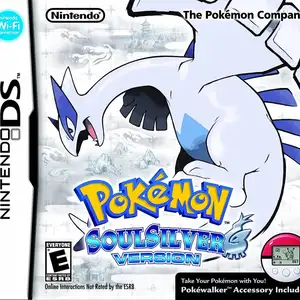
Pokémon SoulSilver
⋯
About this game
Pokémon SoulSilver is a role-playing game developed by Game Freak and published by Nintendo for Nintendo DS, a remake of the classic Game Boy Color Pokémon Silver, paired with Pokémon HeartGold. The adventure takes place in the Johto region. Players start their journey in New Bark Town, pick one starter Pokémon from Chikorita, Cyndaquil and Totodile, challenge gym leaders, fight the revived Team Rocket, and unlock the Kanto region after beating the Elite Four. It features the famous Pokémon follow mechanic, where the lead Pokémon walks behind the trainer on the overworld. The original physical release bundled the Pokéwalker pedometer accessory, letting players transfer Pokémon to gain EXP, find items and encounter wild Pokémon by walking. It supports touchscreen controls, day-night cycle, local wireless trade and battle, with Lugia as the cover legendary Pokémon.
Contributors
No contributors recorded yet.
💡 Guides
✎ Write a guideNo guides yet
You might also like
Same platform, same genre, or from the same developer
 NES
Super Mario Bros.3
 ARCADE
Double Dragon (Neo-Geo)
 NES
Circus Charlie
 ARCADE
Knights of the Round
 FLASH
THE KING OF FIGHTERS:WING
 FLASH
Gold Miner
 FLASH
cat mario
 ARCADE
Metal Slug X: Super Vehicle 001
FAQ
- How can I play Pokémon SoulSilver?
- You can play Pokémon SoulSilver online for free right in your browser on 8BitGo. No download or emulator installation is required.
- What platform is Pokémon SoulSilver?
- 8BitGo classifies this version as Nintendo DS. That describes how it runs here and may differ from the game's original release platform. You can play it directly in the browser.
- Can I save my progress in Pokémon SoulSilver?
- Save support depends on how this game runs. Quick saves and cloud saves are available only when the player toolbar shows a save control; otherwise use the game's own save feature.
- Does Pokémon SoulSilver work on mobile?
- It depends on the game. Check the controls on this page: games with on-screen buttons work on touch devices, while keyboard-and-mouse games are best played on desktop.
Controls
These are the default keys. Click the gamepad icon 🎮 in the player toolbar, then “Remap keys” to open the emulator’s own control settings (keyboard and gamepad, saved automatically). Gamepads are detected automatically. On phones you get on-screen buttons.
1P
D-Pad
W S A D
A
K
B
J
X
I
Y
U
L
Q
R
E
Start
Enter
Select
Shift
Quick save
F2
Quick load
F4
2P
D-Pad
Numpad 8 2 4 6
A
Numpad 7
B
Numpad 9
X
Numpad *
Y
Numpad /
L
Numpad -
R
Numpad +
Start
Numpad 1
Select
Numpad 3
2P uses the numeric keypad with NumLock on; a second gamepad becomes 2P automatically. No numpad? Open 🎮 → Remap keys, switch to Player 2 and pick other keys.