
Checking this game’s age requirement…
Mitsume ga Tōru
About this game
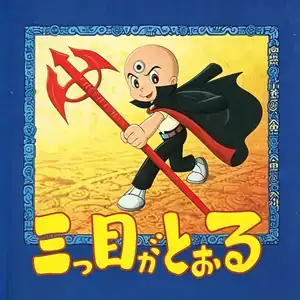
Mitsume ga Tōru (known to Chinese retro players as The Three-Eyed Boy / Three-Eyed One) is a side-scrolling action game developed and published by Tomy, released for the Famicom (NES) in 1992. It is adapted from Osamu Tezuka’s classic manga. Players control Sharaku Hosuke, the last survivor of the ancient three-eyed tribe. He embarks on an adventure to rescue Wato Chiyoko, who has been kidnapped by the villain Godal from the three-eyed clan. The iconic weapon Red Eagle can attack foes and act as a floating platform to perform double jumps, which is essential for progressing through stages. Multiple bullet types are available: fire, wave, sonic and high-power shots. Hidden golden chickens are scattered in every level; hitting them drops coins, which can be spent in shops for ammo, extra lives and supplies. Two difficulty modes, Easy and Normal, are selectable. Boasting fluid pixel animation and tight combat controls, it features well-crafted level design. Widely distributed on pirate multicarts for the Subor Famicom clone in China, it remains one of the most beloved classic NES games for generations of retro gamers.
- Release year
- 1992
- Developer
- Players
- Single player
- Supported languages
- 简体中文 · English · Español
FAQ
- How can I play Mitsume ga Tōru?
- You can play Mitsume ga Tōru online for free right in your browser on 8BitGo. No download or emulator installation is required.
- What platform is Mitsume ga Tōru?
- 8BitGo classifies this version as NES (Famicom). That describes how it runs here and may differ from the game's original release platform. You can play it directly in the browser.
- Can I save my progress in Mitsume ga Tōru?
- Save support depends on how this game runs. Quick saves and cloud saves are available only when the player toolbar shows a save control; otherwise use the game's own save feature.
- Does Mitsume ga Tōru work on mobile?
- It depends on the game. Check the controls on this page: games with on-screen buttons work on touch devices, while keyboard-and-mouse games are best played on desktop.
Controls
These are the default keys. Click the gamepad icon 🎮 in the player toolbar, then “Remap keys” to open the emulator’s own control settings (keyboard and gamepad, saved automatically). Gamepads are detected automatically. On phones you get on-screen buttons.
D-Pad
W S A D
A
K
B
J
Start
Enter
Select
Shift
Quick save
F2
Quick load
F4
You might also like
Same platform, same genre, or from the same developer
 NES
NESSuper Mario Bros.
Contra
 NES
NESSuper Mario Bros.3
 NES
NESTeenage Mutant Ninja Turtles III: The Manhattan Project
 NES
NESCircus Charlie
 NES
NESRoad Fighter
 NES
NESBomberman II
 NES
NES