
Verifica del requisito di età del gioco…
Popeye
Informazioni sul gioco
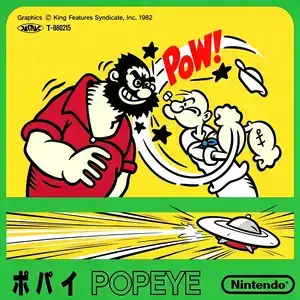
Popeye (Japanese: ポパイ) is a fixed-screen platform action game developed by Nintendo. It was released on July 15, 1983 as one of the Famicom’s launch titles, ported from the 1982 arcade game and adapted from the classic Popeye comic. Players control Popeye the Sailor, climbing ladders across four stacked dockside platforms to collect items thrown down by Olive Oyl. Stage 1 requires collecting hearts, stage 2 musical notes, and stage 3 letters spelling HELP. Collect all required items to clear each stage. Popeye’s rival Brutus chases relentlessly, throwing bottles and leaping to ambush. Popeye’s punch cannot hurt Brutus normally; it only breaks bottles and projectiles. Touching Brutus costs a life. Punch and open the spinach can to activate temporary super strength. Powered-up Popeye can knock Brutus off the screen, and falling collectibles freeze temporarily with doubled points. If Olive’s items sink into the water before collection, you lose a life. Starting from the second loop, the Sea Hag appears and throws skull projectiles, raising difficulty significantly. There are three fixed-screen stages, which repeat endlessly with faster enemies after completion. It supports two-player turn-based gameplay and two difficulty settings Game A and Game B. It features simple pixel art and soundtrack inspired by the cartoon. Widely bundled on Subor multicarts in China, the iconic spinach power-up makes it a memorable Famicom classic for retro gamers.
- Anno di uscita
- 1990
- Sviluppatore
- Giocatori
- Giocatore singolo
- Lingue supportate
- 简体中文 · English · 日本語
Domande frequenti
- Come posso giocare a Popeye?
- Puoi giocare a Popeye online e gratuitamente direttamente nel tuo browser su 8BitGo. Non è richiesto alcun download né l'installazione di emulatori.
- Su quale piattaforma è Popeye?
- 8BitGo classifica questa versione come NES (Famicom). Questo descrive come viene eseguita qui e può differire dalla piattaforma di uscita originale. Puoi giocare direttamente nel browser.
- Posso salvare i miei progressi in Popeye?
- Il supporto ai salvataggi dipende da come viene eseguito il gioco. Salvataggi rapidi e cloud sono disponibili solo se la barra del player mostra il relativo comando; altrimenti usa il salvataggio interno del gioco.
- Popeye funziona su mobile?
- Dipende dal gioco. Controlla i comandi in questa pagina: i giochi con pulsanti su schermo funzionano via touch, mentre quelli con tastiera e mouse sono più adatti al computer.
Comandi
Questi sono i tasti predefiniti. Fai clic sull’icona del gamepad 🎮 nella barra del player, poi su «Rimappa i tasti» per aprire le impostazioni dei controlli dell’emulatore (tastiera e gamepad, salvate automaticamente). I gamepad vengono rilevati in automatico. Su smartphone compaiono i pulsanti a schermo.
Croce direzionale
W S A D
A
K
B
J
Start
Enter
Select
Shift
Salvataggio rapido
F2
Caricamento rapido
F4
Potrebbe piacerti anche
Stessa piattaforma, stesso genere o stesso sviluppatore
 DOS
DOSAge of Empires
 NES
NESSuper Mario Bros.3
 NDS
NDSPlants vs. Zombies
 NES
NESCircus Charlie
 NES
NESGomoku Narabe Renju
 NDS
NDSGrand Theft Auto: Chinatown Wars
 GBA
GBAThe King of Fighters EX: Neo Blood
 ARCADE