
Verifica del requisito di età del gioco…
Gomoku Narabe Renju
Informazioni sul gioco
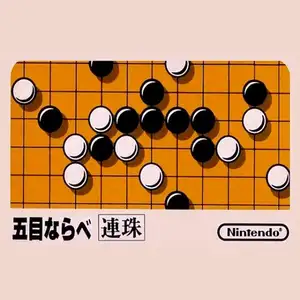
Gomoku (known as Five in a Row for Chinese retro players, Japanese: Gomoku Narabe) is a classic board game title on the Famicom. The most famous version is the official Nintendo Gomoku game. Based on traditional Japanese five-in-a-row rules, black and white players place stones in turns. The first player to connect five stones in a row horizontally, vertically or diagonally wins. It supports human vs AI and two-player local versus modes. Multiple AI difficulty tiers are available. Easy AI plays cautiously, while hard AI excels at defense, threats and double-three attacks, great for learning basic gomoku tactics. The UI is simple with a standard 15×15 board. You move the cursor to drop stones, and an undo function supports reviewing moves. Lacking flashy visuals, it focuses entirely on turn-based board strategy. Included on many Subor multicarts in China, it introduced countless players to Gomoku. It is one of the few pure puzzle & board games on the Famicom.
- Anno di uscita
- 1990
- Sviluppatore
- Giocatori
- 2 giocatori
- Lingue supportate
- 简体中文 · English · 日本語
Domande frequenti
- Come posso giocare a Gomoku Narabe Renju?
- Puoi giocare a Gomoku Narabe Renju online e gratuitamente direttamente nel tuo browser su 8BitGo. Non è richiesto alcun download né l'installazione di emulatori.
- Su quale piattaforma è Gomoku Narabe Renju?
- 8BitGo classifica questa versione come NES (Famicom). Questo descrive come viene eseguita qui e può differire dalla piattaforma di uscita originale. Puoi giocare direttamente nel browser.
- Posso salvare i miei progressi in Gomoku Narabe Renju?
- Il supporto ai salvataggi dipende da come viene eseguito il gioco. Salvataggi rapidi e cloud sono disponibili solo se la barra del player mostra il relativo comando; altrimenti usa il salvataggio interno del gioco.
- Gomoku Narabe Renju funziona su mobile?
- Dipende dal gioco. Controlla i comandi in questa pagina: i giochi con pulsanti su schermo funzionano via touch, mentre quelli con tastiera e mouse sono più adatti al computer.
Comandi
Questi sono i tasti predefiniti. Fai clic sull’icona del gamepad 🎮 nella barra del player, poi su «Rimappa i tasti» per aprire le impostazioni dei controlli dell’emulatore (tastiera e gamepad, salvate automaticamente). I gamepad vengono rilevati in automatico. Su smartphone compaiono i pulsanti a schermo.
Croce direzionale
W S A D
A
K
B
J
Start
Enter
Select
Shift
Salvataggio rapido
F2
Caricamento rapido
F4
Potrebbe piacerti anche
Stessa piattaforma, stesso genere o stesso sviluppatore
 DOS
DOSAge of Empires
 NES
NESSuper Mario Bros.3
 NDS
NDSPlants vs. Zombies
 NES
NESCircus Charlie
 NDS
NDSGrand Theft Auto: Chinatown Wars
 GBA
GBAThe King of Fighters EX: Neo Blood
 ARCADE
Knights of the Round
 NES
NES