
Verifica del requisito di età del gioco…
Galaga
Informazioni sul gioco
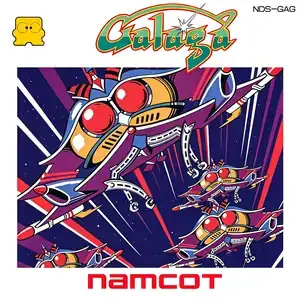
Galaga (Japanese: ギャラガ) is a fixed-screen vertical shoot 'em up developed by Namco. It originally launched in arcades in 1981 and was ported to the Famicom in 1985. It is the direct sequel to Galaxian and one of the defining space shooters of arcade’s golden age. Players control a starship at the bottom of the screen, moving only left and right and firing shots to eliminate alien insect enemies in formation. Foes either stay in formation or dive along curved flight paths while firing projectiles. Its most famous feature: large boss aliens fire tractor beams to capture your fighter. If you defeat the alien holding your captured ship, the rescued fighter merges with yours into a dual fighter with doubled firepower. The tradeoff is a wider hitbox; one single hit destroys both ships. Every several stages are challenge stages, where enemies perform flight patterns without shooting, letting players rack up bonus points. Clear all foes on screen to proceed. The game loops endlessly with faster enemy dives and denser bullets. Extra ships are awarded at score milestones. Two players can take turns playing. The Famicom port faithfully preserves core gameplay and sound with simplified graphics adapted for the hardware. Widely included on Subor multicarts in China, its unique ship capture and dual fighter mechanic makes it a beloved classic space shooter for retro gamers.
- Anno di uscita
- 1990
- Sviluppatore
- Giocatori
- Giocatore singolo
- Lingue supportate
- 简体中文 · English · 日本語
Domande frequenti
- Come posso giocare a Galaga?
- Puoi giocare a Galaga online e gratuitamente direttamente nel tuo browser su 8BitGo. Non è richiesto alcun download né l'installazione di emulatori.
- Su quale piattaforma è Galaga?
- 8BitGo classifica questa versione come NES (Famicom). Questo descrive come viene eseguita qui e può differire dalla piattaforma di uscita originale. Puoi giocare direttamente nel browser.
- Posso salvare i miei progressi in Galaga?
- Il supporto ai salvataggi dipende da come viene eseguito il gioco. Salvataggi rapidi e cloud sono disponibili solo se la barra del player mostra il relativo comando; altrimenti usa il salvataggio interno del gioco.
- Galaga funziona su mobile?
- Dipende dal gioco. Controlla i comandi in questa pagina: i giochi con pulsanti su schermo funzionano via touch, mentre quelli con tastiera e mouse sono più adatti al computer.
Comandi
Questi sono i tasti predefiniti. Fai clic sull’icona del gamepad 🎮 nella barra del player, poi su «Rimappa i tasti» per aprire le impostazioni dei controlli dell’emulatore (tastiera e gamepad, salvate automaticamente). I gamepad vengono rilevati in automatico. Su smartphone compaiono i pulsanti a schermo.
Croce direzionale
W S A D
A
K
B
J
Start
Enter
Select
Shift
Salvataggio rapido
F2
Caricamento rapido
F4
Potrebbe piacerti anche
Stessa piattaforma, stesso genere o stesso sviluppatore
 DOS
DOSAge of Empires
 NES
NESSuper Mario Bros.3
 NDS
NDSPlants vs. Zombies
 NES
NESCircus Charlie
 NES
NESGomoku Narabe Renju
 NDS
NDSGrand Theft Auto: Chinatown Wars
 GBA
GBAThe King of Fighters EX: Neo Blood
 ARCADE