
Checking this game’s age requirement…
About this game
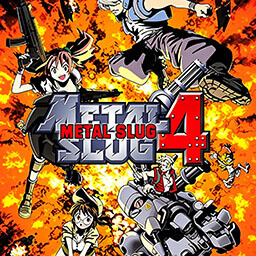
Metal Slug 4 is a classic horizontal scroll arcade shooting game released in 2002 for the Neo‑Geo platform, developed by Mega Enterprise and Noise Factory after SNK’s restructuring. As the fourth official installment of the iconic Metal Slug series, it inherits the exquisite pixel art, gorgeous explosion effects and fast-paced combat of previous works, while introducing brand-new playable characters, exclusive gameplay mechanisms and upgraded weapons and vehicles. It remains a beloved vintage arcade shooting classic for retro game enthusiasts worldwide. Set one year after the ending of Metal Slug 3, the game continues the classic military sci-fi worldview and confronts rebel forces and mysterious enemy factions. It features an updated character roster, introducing two brand-new protagonists, Trevor and Nadia, alongside returning classic characters Marco and Fio. Optimized action modules and smooth combat animations bring a fresh and fluent gaming experience different from previous series entries. Metal Slug 4 adds innovative gameplay features on the basis of retaining core series mechanics. The newly launched medal scoring system allows players to collect medals and build kill combos for extra scores, greatly improving replayability and score-chasing fun. It also introduces a unique mutation system: players hit by enemy scientists will transform into monkey form with exclusive movement and attack attributes, bringing rich randomness and interesting easter eggs to the traditional level-clearing gameplay. The game expands the weapon and vehicle system comprehensively, adding the powerful dual machine gun (2H) and upgrading firepower performance. It retains classic weapons such as shotguns, rocket launchers and laser weapons, and enriches tactical matching diversity. It inherits classic sea, land and air vehicles while adding new exclusive vehicles including forklifts, walking mechs and special military trucks. With six progressive levels spanning urban ruins, jungles and military bases, and spectacular elite boss battles, the game delivers immersive and thrilling combat experience. Supporting classic two-player co-op mode, Metal Slug 4 is perfect for team-based arcade entertainment. It provides adjustable difficulty modes for both casual beginners and skilled veteran players. Fully compatible with various arcade emulators, it runs smoothly on modern devices and perfectly restores the original pixel visuals, sound effects and tight combat rhythm, standing as an enduring classic in retro arcade shooting games.
- Release year
- 2002
- Developer
- ,
- Players
- 2 players
- Supported languages
- English
FAQ
- How can I play Metal Slug 4?
- You can play Metal Slug 4 online for free right in your browser on 8BitGo. No download or emulator installation is required.
- What platform is Metal Slug 4?
- 8BitGo classifies this version as Arcade. That describes how it runs here and may differ from the game's original release platform. You can play it directly in the browser.
- Can I save my progress in Metal Slug 4?
- Save support depends on how this game runs. Quick saves and cloud saves are available only when the player toolbar shows a save control; otherwise use the game's own save feature.
- Does Metal Slug 4 work on mobile?
- It depends on the game. Check the controls on this page: games with on-screen buttons work on touch devices, while keyboard-and-mouse games are best played on desktop.
Controls
These are the default keys. Every arcade board has a different number of buttons and means different things by them. The rows above are buttons 1–6 on the board: on Neo Geo boards (The King of Fighters and friends) A/B/C/D are buttons 1–4, Metal Slug uses only 1, 2 and 4 (shoot / jump / grenade), and Pac-Man uses none at all. Six-button fighters with three punches and three kicks (Street Fighter II and the like) get a different layout from the core: light punch U, medium punch I, heavy punch Q, light kick J, medium kick K, heavy kick E. Click the gamepad icon 🎮 in the player toolbar, then “Remap keys” to open the emulator’s own control settings (keyboard and gamepad, saved automatically). Gamepads are detected automatically. On phones you get on-screen buttons.
D-Pad
W S A D
Button 1
J
Button 2
K
Button 3
U
Button 4
I
Button 5
E
Button 6
Q
Insert coin
V
Start
Enter
Quick save
F2
Quick load
F4
You might also like
Same platform, same genre, or from the same developer
 ARCADE
JoJo's Bizarre Adventure: Heritage for the Future
 ARCADE
Warriors of Fate
 ARCADE
Knights of the Round
 ARCADE
Street Fighter III: 3rd Strike - Fight for the Future
 ARCADE
Marvel vs. Capcom: Clash of Super Heroes
 ARCADE
The King of Fighters 2000
 ARCADE
Raiden II
 ARCADE