
Checking this game’s age requirement…
Warriors of Fate
About this game
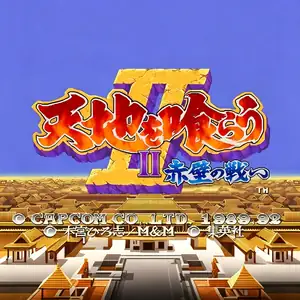
Tenchi wo Kurau II: Sekiheki no Tatakai, internationally titled Warriors of Fate and widely known as Sangokushi 2 among Chinese‑speaking players, is a CPS‑1 side‑scrolling beat‑'em‑up released by Capcom in 1992. Based on Hiroshi Motomiya’s manga Tenchi wo Kurau, it is the peak sequel in the Tenchi wo Kurau franchise and one of the most legendary Three‑Kingdoms‑themed arcade games. The campaign starts from the Battle of Bowang Slope and leads through the Battle of Red Cliff, depicting Liu Bei’s generals fighting against Cao Cao’s forces. Up to three players can join co‑op gameplay, choosing from five distinct heroes: Guan Yu, Zhang Fei, Zhao Yun, Huang Zhong and Wei Yan, each with unique stats and special moves. Moving away from the mount‑focused combat of the first game, infantry‑style brawling takes center stage. The system features combos, throws, aerial grabs and health‑costing special attacks. Players can pick up swords, spears, maces and rare secret weapons such as Yitian and Holy Sword. Food items hidden inside destructible crates restore health, while horse‑mounted combat remains available. Across nine stages, players fight powerful Wei generals including Li Dian, Xiahou Dun, Xu Chu and Zhang Liao. Praised for its satisfying combat and striking manga‑style visuals, the arcade original can be experienced via MAME emulators. It was later ported to PlayStation and Sega Saturn, and remains an iconic landmark of beat‑'em‑up arcade history.
- Release year
- 1992
- Developer
- Players
- 3 players
- Supported languages
- 简体中文 · English · 日本語
FAQ
- How can I play Warriors of Fate?
- You can play Warriors of Fate online for free right in your browser on 8BitGo. No download or emulator installation is required.
- What platform is Warriors of Fate?
- 8BitGo classifies this version as Arcade. That describes how it runs here and may differ from the game's original release platform. You can play it directly in the browser.
- Can I save my progress in Warriors of Fate?
- Save support depends on how this game runs. Quick saves and cloud saves are available only when the player toolbar shows a save control; otherwise use the game's own save feature.
- Does Warriors of Fate work on mobile?
- It depends on the game. Check the controls on this page: games with on-screen buttons work on touch devices, while keyboard-and-mouse games are best played on desktop.
Controls
These are the default keys. Every arcade board has a different number of buttons and means different things by them. The rows above are buttons 1–6 on the board: on Neo Geo boards (The King of Fighters and friends) A/B/C/D are buttons 1–4, Metal Slug uses only 1, 2 and 4 (shoot / jump / grenade), and Pac-Man uses none at all. Six-button fighters with three punches and three kicks (Street Fighter II and the like) get a different layout from the core: light punch U, medium punch I, heavy punch Q, light kick J, medium kick K, heavy kick E. Click the gamepad icon 🎮 in the player toolbar, then “Remap keys” to open the emulator’s own control settings (keyboard and gamepad, saved automatically). Gamepads are detected automatically. On phones you get on-screen buttons.
D-Pad
W S A D
Button 1
J
Button 2
K
Button 3
U
Button 4
I
Button 5
E
Button 6
Q
Insert coin
V
Start
Enter
Quick save
F2
Quick load
F4
You might also like
Same platform, same genre, or from the same developer
Cadillacs and Dinosaurs
 ARCADE
JoJo's Bizarre Adventure: Heritage for the Future
 ARCADE
Marvel Super Heroes vs Street Fighter
 ARCADE
Street Fighter Alpha 3
.webp) ARCADE
ARCADESuper Street Fighter II Turbo
 GBA
GBAPhoenix Wright: Ace Attorney
 ARCADE
Street Fighter
 GB
GB