
Checking this game’s age requirement…
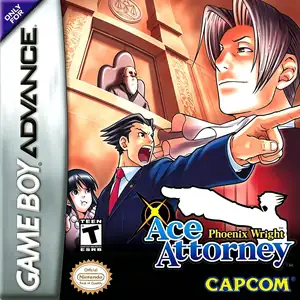
Phoenix Wright: Ace Attorney
About this game
Phoenix Wright: Ace Attorney (Japanese: Gyakuten Saiban) is Capcom’s courtroom visual‑novel adventure released for Game Boy Advance on October 12, 2001, the original entry founding the Ace Attorney franchise. Gameplay is split into investigation and courtroom cross‑examination segments. Players collect evidence and interview witnesses at crime scenes, then expose contradictions in courtroom testimonies to prove clients’ innocence. The original GBA release features four episodes; the bonus case Rise from the Ashes was added in later ports. It follows rookie defense attorney Phoenix Wright, aided by Maya Fey, clashing with prosecutor Miles Edgeworth and unraveling the famous DL‑6 incident. Originally released only in Japan, it received high‑quality fan‑made Chinese translation and is playable via GBA emulators. Praised for creative cases, memorable characters and iconic soundtrack, it stands as one of the greatest visual‑novel titles on GBA.
- Release year
- 2001
- Developer
- Players
- Single player
- Supported languages
- 简体中文 · English · 日本語
FAQ
- How can I play Phoenix Wright: Ace Attorney?
- You can play Phoenix Wright: Ace Attorney online for free right in your browser on 8BitGo. No download or emulator installation is required.
- What platform is Phoenix Wright: Ace Attorney?
- 8BitGo classifies this version as Game Boy Advance. That describes how it runs here and may differ from the game's original release platform. You can play it directly in the browser.
- Can I save my progress in Phoenix Wright: Ace Attorney?
- Save support depends on how this game runs. Quick saves and cloud saves are available only when the player toolbar shows a save control; otherwise use the game's own save feature.
- Does Phoenix Wright: Ace Attorney work on mobile?
- It depends on the game. Check the controls on this page: games with on-screen buttons work on touch devices, while keyboard-and-mouse games are best played on desktop.
Controls
These are the default keys. Click the gamepad icon 🎮 in the player toolbar, then “Remap keys” to open the emulator’s own control settings (keyboard and gamepad, saved automatically). Gamepads are detected automatically. On phones you get on-screen buttons.
D-Pad
W S A D
A
K
B
J
L
Q
R
E
Start
Enter
Select
Shift
Quick save
F2
Quick load
F4
You might also like
Same platform, same genre, or from the same developer
Cadillacs and Dinosaurs
 ARCADE
JoJo's Bizarre Adventure: Heritage for the Future
 ARCADE
Warriors of Fate
 ARCADE
Marvel Super Heroes vs Street Fighter
 ARCADE
Street Fighter Alpha 3
.webp) ARCADE
ARCADESuper Street Fighter II Turbo
 ARCADE
Street Fighter
 GB
GB