
Checking this game’s age requirement…
About this game
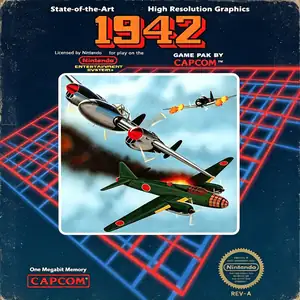
1942 is a classic vertical‑scroll shoot‑em‑up developed by Capcom. First released for arcades in 1984, it was ported to the Famicom / NES console in 1985, launching the well‑known 194X aerial combat game series. Set in the World War II Pacific War, players pilot a P‑38 Lightning fighter jet through 32 challenging stages, advancing toward Tokyo while fighting wave after wave of enemy aircraft. It features the iconic loop‑de‑loop evasion skill, granting brief invincibility at the cost of limited uses, acting as an early prototype for bomb mechanics in later shoot‑em‑ups抖音百科. Destroying red enemy formations drops POW power‑ups, unlocking quad machine‑guns, wingman escorts and extra lives. Alternating two‑player mode is available for high‑score competition. A landmark 80‑s arcade shooter, 1942 laid the foundation for Capcom’s shoot‑em‑up design and spawned the sequel 1943: The Battle of Midway. The NES port sold over one million copies worldwide and has been re‑released in multiple Capcom retro compilations. Today the full game including loop‑de‑loop mechanics can be played via emulators, remaining a must‑play classic among retro NES vertical shooter titles.
- Release year
- 1985
- Developer
- Players
- Single player
- Supported languages
- 简体中文 · English · 日本語 · Español
FAQ
- How can I play 1942?
- You can play 1942 online for free right in your browser on 8BitGo. No download or emulator installation is required.
- What platform is 1942?
- 8BitGo classifies this version as NES (Famicom). That describes how it runs here and may differ from the game's original release platform. You can play it directly in the browser.
- Can I save my progress in 1942?
- Save support depends on how this game runs. Quick saves and cloud saves are available only when the player toolbar shows a save control; otherwise use the game's own save feature.
- Does 1942 work on mobile?
- It depends on the game. Check the controls on this page: games with on-screen buttons work on touch devices, while keyboard-and-mouse games are best played on desktop.
Controls
These are the default keys. Click the gamepad icon 🎮 in the player toolbar, then “Remap keys” to open the emulator’s own control settings (keyboard and gamepad, saved automatically). Gamepads are detected automatically. On phones you get on-screen buttons.
D-Pad
W S A D
A
K
B
J
Start
Enter
Select
Shift
Quick save
F2
Quick load
F4
You might also like
Same platform, same genre, or from the same developer
Cadillacs and Dinosaurs
 ARCADE
JoJo's Bizarre Adventure: Heritage for the Future
 ARCADE
Warriors of Fate
 ARCADE
Marvel Super Heroes vs Street Fighter
 ARCADE
Street Fighter Alpha 3
.webp) ARCADE
ARCADESuper Street Fighter II Turbo
 GBA
GBAPhoenix Wright: Ace Attorney
 ARCADE