
Verifica del requisito di età del gioco…
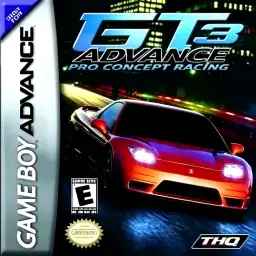
GT Advance 3: Pro Concept Racing
Informazioni sul gioco
GT Advance 3: Pro Concept Racing is a realistic racing title developed by MTO and published by THQ for Game Boy Advance in 2003, known in Japan as Advance GT 2. As the third entry in the GT Advance series, it returns to circuit‑based road racing instead of rally gameplay from GT Advance 2. Praised as the GBA‑version Gran Turismo, it delivers impressive pseudo‑3D racing performance and stands among the best racing games on GBA hardware. Players progress through a full career mode, earn licenses and compete in various tournament cups to unlock cars, tracks and upgrade parts. The game features 97 officially licensed cars from real‑world manufacturers and 46 diverse race circuits. Besides career and quick race modes, it introduces a special drift combo challenge, where players perform successive drifts under time limit to unlock bonus vehicles, greatly improving replay value. It provides comprehensive car tuning systems. Players can upgrade engine, suspension, muffler, LSD and air filter to adjust top speed, acceleration and cornering grip. Vehicle tuning directly changes driving physics. The game favors power‑slide drifting mechanics, and gold‑rank license tests demand precise corner‑line control, bringing decent difficulty for racing enthusiasts. Adopting GBA pseudo‑3D graphic technology, the game maintains stable frame‑rate with detailed track and car visuals. The cartridge supports native save function, getting rid of password‑save system from the first title. Multi‑player versus is available via GBA link cable for head‑to‑head races between two players. Originally released as physical GBA cartridge, the game can be played smoothly on modern GBA emulators for PC and mobile devices. With massive car roster, rich tracks and deep tuning mechanics, it remains a must‑play classic vintage handheld racing game.
- Anno di uscita
- 2002
- Sviluppatore
- Giocatori
- Giocatore singolo
- Lingue supportate
- 简体中文 · English
Domande frequenti
- Come posso giocare a GT Advance 3: Pro Concept Racing?
- Puoi giocare a GT Advance 3: Pro Concept Racing online e gratuitamente direttamente nel tuo browser su 8BitGo. Non è richiesto alcun download né l'installazione di emulatori.
- Su quale piattaforma è GT Advance 3: Pro Concept Racing?
- 8BitGo classifica questa versione come Game Boy Advance. Questo descrive come viene eseguita qui e può differire dalla piattaforma di uscita originale. Puoi giocare direttamente nel browser.
- Posso salvare i miei progressi in GT Advance 3: Pro Concept Racing?
- Il supporto ai salvataggi dipende da come viene eseguito il gioco. Salvataggi rapidi e cloud sono disponibili solo se la barra del player mostra il relativo comando; altrimenti usa il salvataggio interno del gioco.
- GT Advance 3: Pro Concept Racing funziona su mobile?
- Dipende dal gioco. Controlla i comandi in questa pagina: i giochi con pulsanti su schermo funzionano via touch, mentre quelli con tastiera e mouse sono più adatti al computer.
Comandi
Questi sono i tasti predefiniti. Fai clic sull’icona del gamepad 🎮 nella barra del player, poi su «Rimappa i tasti» per aprire le impostazioni dei controlli dell’emulatore (tastiera e gamepad, salvate automaticamente). I gamepad vengono rilevati in automatico. Su smartphone compaiono i pulsanti a schermo.
Croce direzionale
W S A D
A
K
B
J
L
Q
R
E
Start
Enter
Select
Shift
Salvataggio rapido
F2
Caricamento rapido
F4
Potrebbe piacerti anche
Stessa piattaforma, stesso genere o stesso sviluppatore
 GBA
GBAInitial D: Another Stage
 GBA
GBACars
 GBA
GBAPokémon FireRed
 GBA
GBAPokémon Emerald
 GBA
GBAPokémon Ruby
 GBA
GBAGrand Theft Auto:Advance
 GBA
GBARhythm Heaven
 GBA
GBA