
Comprobando el requisito de edad de este juego…
Pokémon HeartGold
Sobre este juego
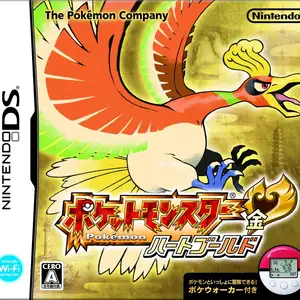
Pokémon HeartGold Version is a Pokémon role-playing game developed by Game Freak and published by Nintendo for Nintendo DS, a remake of the original Pokémon Gold on Game Boy Color, released in 2009. The adventure starts in New Bark Town of Johto region. Players pick one starter Pokémon among Chikorita, Cyndaquil and Totodile from Professor Elm, challenge eight Johto gym leaders, fight against the criminal Team Rocket, defeat the Elite Four and Champion. After clearing the main story, players can travel to Kanto and collect all 16 gym badges, then battle the legendary trainer Red. Its famous feature is the Pokémon follow system, where the first Pokémon in party walks behind the player on overworld with interactive reactions. It bundled with Pokéwalker, a pedometer accessory to transfer Pokémon and gain EXP by walking. The box legendary is Ho-Oh. It adopts Gen 4 battle mechanics, touch screen support and abundant side quests, widely regarded as one of the best remakes in Pokémon series.
- Año de lanzamiento
- 1990
- Desarrolladora
- Jugadores
- 1 jugador
- Idiomas compatibles
- 简体中文 · 繁體中文 · English · 日本語 · Français · Deutsch · Español · Italiano
Preguntas frecuentes
- ¿Cómo puedo jugar a Pokémon HeartGold?
- Puedes jugar a Pokémon HeartGold en línea y gratis directamente en tu navegador en 8BitGo. No necesitas descargar nada ni instalar ningún emulador.
- ¿En qué plataforma es Pokémon HeartGold?
- 8BitGo clasifica esta versión como Nintendo DS. Esto describe cómo se ejecuta aquí y puede diferir de la plataforma de lanzamiento original. Puedes jugar directamente en el navegador.
- ¿Puedo guardar mi progreso en Pokémon HeartGold?
- La posibilidad de guardar depende de cómo se ejecute el juego. El guardado rápido y en la nube solo está disponible si la barra del reproductor muestra un control de guardado; si no, usa el guardado propio del juego.
- ¿Funciona Pokémon HeartGold en el móvil?
- Depende del juego. Consulta los controles de esta página: los juegos con botones en pantalla funcionan con tacto, mientras que los de teclado y ratón se disfrutan mejor en un ordenador.
Controles
Estas son las teclas predeterminadas. Haz clic en el icono de mando 🎮 de la barra del reproductor y luego en «Reasignar teclas» para abrir la configuración de controles del emulador (teclado y mando, se guarda automáticamente). Si conectas un mando, se detecta solo. En el teléfono aparecen botones en pantalla.
Cruceta
W S A D
A
K
B
J
X
I
Y
U
L
Q
R
E
Start
Enter
Select
Shift
Guardado rápido
F2
Carga rápida
F4
También te puede gustar
Misma plataforma, mismo género o de la misma desarrolladora
 DOS
DOSAge of Empires
 NES
NESSuper Mario Bros.3
 NDS
NDSPlants vs. Zombies
 NES
NESCircus Charlie
 NES
NESGomoku Narabe Renju
 NDS
NDSGrand Theft Auto: Chinatown Wars
 GBA
GBAThe King of Fighters EX: Neo Blood
 ARCADE