
Comprobando el requisito de edad de este juego…
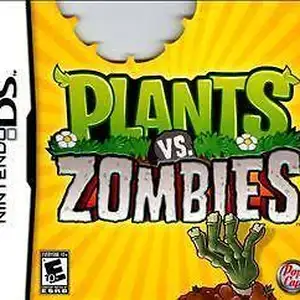
Plants vs. Zombies
Sobre este juego
Plants vs. Zombies for Nintendo DS is a tower defense game developed by PopCap, released on January 18, 2011 in North America. It is the handheld port of the iconic Plants vs. Zombies. Players use the stylus to plant Peashooters, Wall-nuts, Cherry Bombs and other plants to defend the backyard from humorous zombies trying to eat your brains. It retains all core PC content including Adventure, Puzzle, Survival modes, Zen Garden and the Tree of Wisdom. This DS version adds local wireless Versus multiplayer, where two players fight each other as plants and zombies. It also features four exclusive minigames: Air Raid, Home Run Derby, Heat Wave and Bomb All Together, plus the new Trash Can Zombie and 14 unique achievements. It uses DS dual-screen layout: top screen displays the battlefield while the bottom screen handles plant card selection. It is slightly harder than PC version with a maximum of 9 seed slots. A cut-down DSiWare digital edition exists. Fan Chinese translation patch is available. It is a popular casual tower defense title on NDS.
- Año de lanzamiento
- 1990
- Desarrolladora
- Jugadores
- 1 jugador
- Idiomas compatibles
- FR
Preguntas frecuentes
- ¿Cómo puedo jugar a Plants vs. Zombies?
- Puedes jugar a Plants vs. Zombies en línea y gratis directamente en tu navegador en 8BitGo. No necesitas descargar nada ni instalar ningún emulador.
- ¿En qué plataforma es Plants vs. Zombies?
- El lanzamiento original de Plants vs. Zombies fue para la plataforma Nintendo DS. En 8BitGo juegas directamente en el navegador sin configuración adicional.
- ¿Puedo guardar mi progreso en Plants vs. Zombies?
- Sí. La mayoría de los emuladores de 8BitGo admiten guardados rápidos, e iniciar sesión te permite sincronizar las partidas compatibles en la nube.
- ¿Funciona Plants vs. Zombies en el móvil?
- Sí. 8BitGo se adapta a dispositivos táctiles, con controles en pantalla o soporte para mandos Bluetooth.
Controles
Estas son las teclas predeterminadas. Haz clic en el icono de mando 🎮 de la barra del reproductor y luego en «Reasignar teclas» para abrir la configuración de controles del emulador (teclado y mando, se guarda automáticamente). Si conectas un mando, se detecta solo. En el teléfono aparecen botones en pantalla.
Cruceta
W S A D
A
K
B
J
X
I
Y
U
L
Q
R
E
Start
Enter
Select
Shift
Guardado rápido
F2
Carga rápida
F4
También te puede gustar
Misma plataforma, mismo género o de la misma desarrolladora
 NES
NESGomoku Narabe Renju
 HTML5
HTML5Taiko no Tatsujin:Web
 NES
NESSuper Mario Bros.3
 FLASH
FLASHGold Miner
 FLASH
FLASHFireboy & Watergirl 4: In the Crystal Temple
 FLASH
FLASHFireboy & Watergirl 3: In the Ice Temple
 NDS
NDSPokémon SoulSilver
 NDS
NDS