
Comprobando el requisito de edad de este juego…
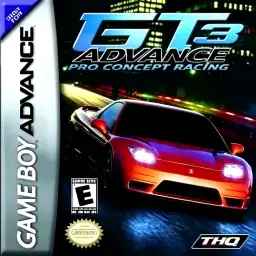
GT Advance 3: Pro Concept Racing
Sobre este juego
GT Advance 3: Pro Concept Racing is a realistic racing title developed by MTO and published by THQ for Game Boy Advance in 2003, known in Japan as Advance GT 2. As the third entry in the GT Advance series, it returns to circuit‑based road racing instead of rally gameplay from GT Advance 2. Praised as the GBA‑version Gran Turismo, it delivers impressive pseudo‑3D racing performance and stands among the best racing games on GBA hardware. Players progress through a full career mode, earn licenses and compete in various tournament cups to unlock cars, tracks and upgrade parts. The game features 97 officially licensed cars from real‑world manufacturers and 46 diverse race circuits. Besides career and quick race modes, it introduces a special drift combo challenge, where players perform successive drifts under time limit to unlock bonus vehicles, greatly improving replay value. It provides comprehensive car tuning systems. Players can upgrade engine, suspension, muffler, LSD and air filter to adjust top speed, acceleration and cornering grip. Vehicle tuning directly changes driving physics. The game favors power‑slide drifting mechanics, and gold‑rank license tests demand precise corner‑line control, bringing decent difficulty for racing enthusiasts. Adopting GBA pseudo‑3D graphic technology, the game maintains stable frame‑rate with detailed track and car visuals. The cartridge supports native save function, getting rid of password‑save system from the first title. Multi‑player versus is available via GBA link cable for head‑to‑head races between two players. Originally released as physical GBA cartridge, the game can be played smoothly on modern GBA emulators for PC and mobile devices. With massive car roster, rich tracks and deep tuning mechanics, it remains a must‑play classic vintage handheld racing game.
- Año de lanzamiento
- 2002
- Desarrolladora
- Jugadores
- 1 jugador
- Idiomas compatibles
- 简体中文 · English
Preguntas frecuentes
- ¿Cómo puedo jugar a GT Advance 3: Pro Concept Racing?
- Puedes jugar a GT Advance 3: Pro Concept Racing en línea y gratis directamente en tu navegador en 8BitGo. No necesitas descargar nada ni instalar ningún emulador.
- ¿En qué plataforma es GT Advance 3: Pro Concept Racing?
- 8BitGo clasifica esta versión como Game Boy Advance. Esto describe cómo se ejecuta aquí y puede diferir de la plataforma de lanzamiento original. Puedes jugar directamente en el navegador.
- ¿Puedo guardar mi progreso en GT Advance 3: Pro Concept Racing?
- La posibilidad de guardar depende de cómo se ejecute el juego. El guardado rápido y en la nube solo está disponible si la barra del reproductor muestra un control de guardado; si no, usa el guardado propio del juego.
- ¿Funciona GT Advance 3: Pro Concept Racing en el móvil?
- Depende del juego. Consulta los controles de esta página: los juegos con botones en pantalla funcionan con tacto, mientras que los de teclado y ratón se disfrutan mejor en un ordenador.
Controles
Estas son las teclas predeterminadas. Haz clic en el icono de mando 🎮 de la barra del reproductor y luego en «Reasignar teclas» para abrir la configuración de controles del emulador (teclado y mando, se guarda automáticamente). Si conectas un mando, se detecta solo. En el teléfono aparecen botones en pantalla.
Cruceta
W S A D
A
K
B
J
L
Q
R
E
Start
Enter
Select
Shift
Guardado rápido
F2
Carga rápida
F4
También te puede gustar
Misma plataforma, mismo género o de la misma desarrolladora
 GBA
GBAInitial D: Another Stage
 GBA
GBACars
 GBA
GBAPokémon FireRed
 GBA
GBAPokémon Emerald
 GBA
GBAPokémon Ruby
 GBA
GBAGrand Theft Auto:Advance
 GBA
GBARhythm Heaven
 GBA
GBA