
Comprobando el requisito de edad de este juego…
Pokémon FireRed
Sobre este juego
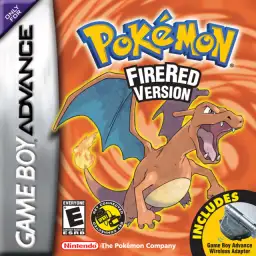
Pokémon FireRed is a classic GBA role-playing game developed by Game Freak and published by Nintendo in 2004. As an official Generation III remake of the original Pokémon Red for Game Boy, it pairs with Pokémon LeafGreen and perfectly inherits the classic Kanto-region adventure while upgrading graphics and gameplay for GBA hardware, remaining a top-tier nostalgic Pokémon game for retro game fans worldwide. The game returns to the iconic Kanto region and restores the complete original storyline. Players start their trainer journey from Pallet Town and choose one of the three classic starters, Bulbasaur, Charmander or Squirtle. Throughout the adventure, players challenge eight gym leaders, defeat the Elite Four, take on the Pokémon League and thwart the evil plans of Team Rocket to protect the peace of Kanto. While retaining all 151 original Generation I Pokémon, Pokémon FireRed upgrades pixel visuals, battle animations and scene details. It integrates complete Generation III mechanics including Pokémon Natures, Abilities and double battles, greatly enriching team building and strategic combat. The most highlight feature is the exclusive Sevii Islands post-game storyline, offering brand-new island maps, abundant side quests and end-game content that greatly extends gameplay duration. The game supports GBA wireless adapter functions, allowing players to trade and battle with Pokémon LeafGreen and Pokémon Emerald versions conveniently. The popular FireRed 386 hack enables players to catch all 386 Pokémon in single-player mode without multiplayer trading. Fully playable on all kinds of GBA emulators with smooth operation and balanced difficulty, Pokémon FireRed is still one of the most popular classic remakes in the Pokémon retro gaming community.
- Año de lanzamiento
- 2004
- Desarrolladora
- Jugadores
- 1 jugador
- Idiomas compatibles
- 简体中文 · 繁體中文 · English · 日本語 · Français · Deutsch · Español · Italiano
Preguntas frecuentes
- ¿Cómo puedo jugar a Pokémon FireRed?
- Puedes jugar a Pokémon FireRed en línea y gratis directamente en tu navegador en 8BitGo. No necesitas descargar nada ni instalar ningún emulador.
- ¿En qué plataforma es Pokémon FireRed?
- 8BitGo clasifica esta versión como Game Boy Advance. Esto describe cómo se ejecuta aquí y puede diferir de la plataforma de lanzamiento original. Puedes jugar directamente en el navegador.
- ¿Puedo guardar mi progreso en Pokémon FireRed?
- La posibilidad de guardar depende de cómo se ejecute el juego. El guardado rápido y en la nube solo está disponible si la barra del reproductor muestra un control de guardado; si no, usa el guardado propio del juego.
- ¿Funciona Pokémon FireRed en el móvil?
- Depende del juego. Consulta los controles de esta página: los juegos con botones en pantalla funcionan con tacto, mientras que los de teclado y ratón se disfrutan mejor en un ordenador.
Controles
Estas son las teclas predeterminadas. Haz clic en el icono de mando 🎮 de la barra del reproductor y luego en «Reasignar teclas» para abrir la configuración de controles del emulador (teclado y mando, se guarda automáticamente). Si conectas un mando, se detecta solo. En el teléfono aparecen botones en pantalla.
Cruceta
W S A D
A
K
B
J
L
Q
R
E
Start
Enter
Select
Shift
Guardado rápido
F2
Carga rápida
F4
También te puede gustar
Misma plataforma, mismo género o de la misma desarrolladora
 GBA
GBAPokémon Emerald
 GBA
GBAPokémon Ruby
 GBA
GBAPokémon LeafGreen
 GBC
GBCPokémon Crystal Version
 NDS
NDSPokémon White 2
 NDS
NDSPokémon Black
 GBC
GBCPokémon Silver Version
 GBA
GBA