Checking this game’s age requirement…
WinDepth
About this game
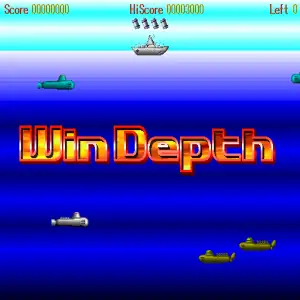
WinDepth, also known as Submarine Battle, is a classic freeware arcade‑style action game developed by Japanese indie group Bio‑100%, released February 20, 1995 for Windows 95. It is a port of the PC‑98 title SuperDepth, and can be played under DOSBox Windows‑95 emulation for retro‑game collections. You control a destroyer warship moving horizontally on the sea surface, dropping depth‑charges to sink hostile submarines and underwater creatures. Depth charges fall with delay, requiring precise timing and prediction. Destroyed submarines can trigger chain explosions for huge combo score bonuses. Ammo is limited; each sunken submarine restores one depth‑charge. Enemies include multiple submarine variants laying mines and homing torpedoes, tentacle monsters, sea mutants and stage bosses. Hit special green targets to unlock air‑support bombing runs. Bonus stages let you wipe out whole submarine formations for massive points. Featuring 20 looping stages, mouse and keyboard controls, and built‑in high‑score leaderboard, WinDepth is a beloved lightweight retro arcade freeware from the Windows 95 era.
- Release year
- 1995
- Developer
- Players
- Single player
- Supported languages
- English
FAQ
- How can I play WinDepth?
- You can play WinDepth online for free right in your browser on 8BitGo. No download or emulator installation is required.
- What platform is WinDepth?
- 8BitGo classifies this version as DOS PC Games. That describes how it runs here and may differ from the game's original release platform. You can play it directly in the browser.
- Can I save my progress in WinDepth?
- Save support depends on how this game runs. Quick saves and cloud saves are available only when the player toolbar shows a save control; otherwise use the game's own save feature.
- Does WinDepth work on mobile?
- It depends on the game. Check the controls on this page: games with on-screen buttons work on touch devices, while keyboard-and-mouse games are best played on desktop.
Controls
These games get the keyboard directly — the controls are whatever the game itself defines, usually in its own help or options screen. Gamepads are detected automatically. On phones you get on-screen buttons.
You might also like
Same platform, same genre, or from the same developer