
Checking this game’s age requirement…
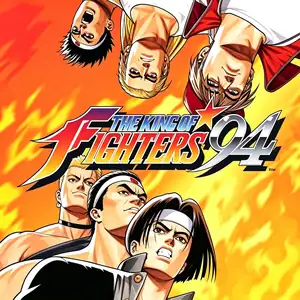
The King of Fighters '94
About this game
The King of Fighters ’94 (KOF 94) is SNK’s landmark fighting title released for Neo‑Geo MVS arcade hardware on August 25, 1994. It is the very first entry in the KOF franchise, pioneering the revolutionary 3‑vs‑3 national‑team tag‑battle system抖音百科. Fighters across the globe receive a mysterious invitation signed only with the letter “R” to join the King of Fighters tournament. The mastermind behind the event is final boss Rugal Bernstein, whose sinister goal is to collect powerful warriors and turn defeated combatants into statues. The winning team is brought aboard an aircraft carrier for the final showdown against Rugal. It assembles an all‑star roster drawing characters from Fatal Fury, Art of Fighting, Ikari Warriors and Psycho Soldier, alongside brand‑new protagonists including Kyo Kusanagi. Teams are fixed by nationality, with no custom team edit function available. The gameplay features a charge‑based power gauge for super special moves, evasive rolls, throw‑escape team assists and guard‑crush mechanics. Its four‑button layout of two punches and two kicks established the control blueprint for the whole KOF series. The arcade original was ported to Neo‑Geo AES and Neo‑Geo CD. A 10‑anniversary remaster *KOF 94 Re‑Bout* launched for PlayStation 2 in 2004. Today the authentic arcade build can be played via Neo‑Geo and MAME emulators. As the origin of the KOF saga, it remains a milestone 2D fighting game of the 1990s.
- Release year
- 1994
- Developer
- Players
- Single player
- Supported languages
- English
FAQ
- How can I play The King of Fighters '94?
- You can play The King of Fighters '94 online for free right in your browser on 8BitGo. No download or emulator installation is required.
- What platform is The King of Fighters '94?
- 8BitGo classifies this version as Arcade. That describes how it runs here and may differ from the game's original release platform. You can play it directly in the browser.
- Can I save my progress in The King of Fighters '94?
- Save support depends on how this game runs. Quick saves and cloud saves are available only when the player toolbar shows a save control; otherwise use the game's own save feature.
- Does The King of Fighters '94 work on mobile?
- It depends on the game. Check the controls on this page: games with on-screen buttons work on touch devices, while keyboard-and-mouse games are best played on desktop.
Controls
These are the default keys. Every arcade board has a different number of buttons and means different things by them. The rows above are buttons 1–6 on the board: on Neo Geo boards (The King of Fighters and friends) A/B/C/D are buttons 1–4, Metal Slug uses only 1, 2 and 4 (shoot / jump / grenade), and Pac-Man uses none at all. Six-button fighters with three punches and three kicks (Street Fighter II and the like) get a different layout from the core: light punch U, medium punch I, heavy punch Q, light kick J, medium kick K, heavy kick E. Click the gamepad icon 🎮 in the player toolbar, then “Remap keys” to open the emulator’s own control settings (keyboard and gamepad, saved automatically). Gamepads are detected automatically. On phones you get on-screen buttons.
D-Pad
W S A D
Button 1
J
Button 2
K
Button 3
U
Button 4
I
Button 5
E
Button 6
Q
Insert coin
V
Start
Enter
Quick save
F2
Quick load
F4
You might also like
Same platform, same genre, or from the same developer
The King of Fighters ’97
 ARCADE
King Of Fighters 2002
 ARCADE
Metal Slug 3
 ARCADE
The King of Fighters ’98
 ARCADE
Metal Slug: Super Vehicle-001
 ARCADE
The King of Fighters 2000
 ARCADE
The King of Fighters 2001
 ARCADE