
Checking this game’s age requirement…
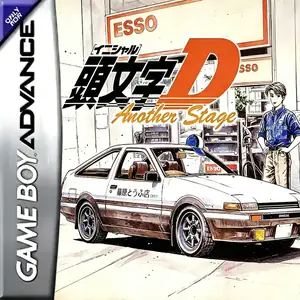
Initial D: Another Stage
About this game
Initial D: Another Stage is the sole official Initial D title released for Game Boy Advance, developed by MTO and published by Sammy in Japan on April 26, 2002. Blending visual‑novel‑style adventure and command‑based touge racing, it is set in an alternate timeline between season 2 and season3 of Initial D anime, before Project‑D’s long‑distance road tour. Players take the role of an original high‑school driver from Gunma, buy one of eight iconic cars from the franchise and work part‑time at a gas station to cover vehicle costs. Instead of direct driving controls, races work with timed menu commands: you must pick proper braking, drift and gutter‑run techniques for every corner. Mistimed choices cause slowdown or crashes. Famous mountain passes and familiar characters such as Takumi, Ryosuke and Keisuke appear throughout the story. Originally Japanese‑only, it later received fan‑made Chinese translation and can be played via GBA emulators.
- Release year
- 2002
- Developer
- Players
- Single player
- Supported languages
- 简体中文 · 日本語
FAQ
- How can I play Initial D: Another Stage?
- You can play Initial D: Another Stage online for free right in your browser on 8BitGo. No download or emulator installation is required.
- What platform is Initial D: Another Stage?
- 8BitGo classifies this version as Game Boy Advance. That describes how it runs here and may differ from the game's original release platform. You can play it directly in the browser.
- Can I save my progress in Initial D: Another Stage?
- Save support depends on how this game runs. Quick saves and cloud saves are available only when the player toolbar shows a save control; otherwise use the game's own save feature.
- Does Initial D: Another Stage work on mobile?
- It depends on the game. Check the controls on this page: games with on-screen buttons work on touch devices, while keyboard-and-mouse games are best played on desktop.
Controls
These are the default keys. Click the gamepad icon 🎮 in the player toolbar, then “Remap keys” to open the emulator’s own control settings (keyboard and gamepad, saved automatically). Gamepads are detected automatically. On phones you get on-screen buttons.
D-Pad
W S A D
A
K
B
J
L
Q
R
E
Start
Enter
Select
Shift
Quick save
F2
Quick load
F4
You might also like
Same platform, same genre, or from the same developer
 GBA
GBAGT Advance 3: Pro Concept Racing
 GBA
GBACars
 GBA
GBAPokémon FireRed
 GBA
GBAPokémon Emerald
 GBA
GBAPokémon Ruby
 GBA
GBAGrand Theft Auto:Advance
 GBA
GBARhythm Heaven
 GBA
GBA