
Checking this game’s age requirement…
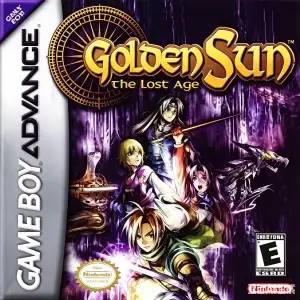
Golden Sun: The Lost Age
About this game
Golden Sun: The Lost Age, released 2003 for GBA by Camelot Software Planning, serves as the direct second half of Golden Sun’s grand story, following protagonist Felix and his companions after the cliffhanger ending of the first game. Sail across the southern seas of Weyard aboard a ship and explore expansive new continents, dungeons and environmental puzzles. Building on Djinn and Psynergy mechanics, total Djinn count rises to 72 with brand‑new multi‑Djinn combo summons and enhanced battle visuals. It supports save‑data import from Golden Sun 1 to transfer Djinn and items, unlocking secret dungeons and bonus bosses. Up to 8 playable characters can be swapped in‑party, with advanced Psynergy abilities including Growth, Freeze and Reveal. Offering huge playtime and narrative closure for the alchemical saga, it stands among GBA’s finest vintage role‑playing games。
- Release year
- 2003
- Developer
- Players
- Single player
- Supported languages
- 简体中文 · English · 日本語 · Français · Italiano
FAQ
- How can I play Golden Sun: The Lost Age?
- You can play Golden Sun: The Lost Age online for free right in your browser on 8BitGo. No download or emulator installation is required.
- What platform is Golden Sun: The Lost Age?
- 8BitGo classifies this version as Game Boy Advance. That describes how it runs here and may differ from the game's original release platform. You can play it directly in the browser.
- Can I save my progress in Golden Sun: The Lost Age?
- Save support depends on how this game runs. Quick saves and cloud saves are available only when the player toolbar shows a save control; otherwise use the game's own save feature.
- Does Golden Sun: The Lost Age work on mobile?
- It depends on the game. Check the controls on this page: games with on-screen buttons work on touch devices, while keyboard-and-mouse games are best played on desktop.
Controls
These are the default keys. Click the gamepad icon 🎮 in the player toolbar, then “Remap keys” to open the emulator’s own control settings (keyboard and gamepad, saved automatically). Gamepads are detected automatically. On phones you get on-screen buttons.
D-Pad
W S A D
A
K
B
J
L
Q
R
E
Start
Enter
Select
Shift
Quick save
F2
Quick load
F4
You might also like
Same platform, same genre, or from the same developer
 GBA
GBAGolden Sun
 GBA
GBAPokémon FireRed
 GBA
GBAPokémon Emerald
 GBA
GBAPokémon Ruby
 GBA
GBAKirby: Nightmare in Dream Land
 GBA
GBAPokémon LeafGreen
 GBA
GBAThe Urbz: Sims in the City
 GBA
GBA