
Checking this game’s age requirement…
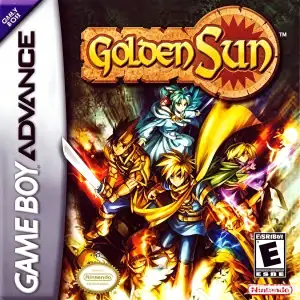
Golden Sun
About this game
Golden Sun is a landmark fantasy turn‑based RPG developed by Camelot Software Planning and published by Nintendo for Game Boy Advance in 2001. Set in the magical world of Weyard powered by ancient Alchemy, protagonist Isaac from Vale Village embarks on an epic quest after antagonists steal four Elemental Stars to unleash forbidden alchemical power. Travel across vast lands and collect four‑element Djinn creatures; assigning Djinn reshapes character classes, stats and powerful summon spells. Psynergy magic serves both as combat skills and puzzle‑solving tools for map puzzles including moving boulders, igniting torches and summoning whirlwinds. Featuring spectacular pseudo‑3D battle animations and cinematic summon cutscenes, it supports GBA link‑cable Djinn trading. The story ends on a major cliffhanger and must be continued in sequel Golden Sun: The Lost Age, one of the most celebrated vintage JRPG titles on GBA hardware.
- Release year
- 2001
- Developer
- Players
- Single player
- Supported languages
- 简体中文 · English · 日本語 · Français · Deutsch · Español · Italiano
FAQ
- How can I play Golden Sun?
- You can play Golden Sun online for free right in your browser on 8BitGo. No download or emulator installation is required.
- What platform is Golden Sun?
- 8BitGo classifies this version as Game Boy Advance. That describes how it runs here and may differ from the game's original release platform. You can play it directly in the browser.
- Can I save my progress in Golden Sun?
- Save support depends on how this game runs. Quick saves and cloud saves are available only when the player toolbar shows a save control; otherwise use the game's own save feature.
- Does Golden Sun work on mobile?
- It depends on the game. Check the controls on this page: games with on-screen buttons work on touch devices, while keyboard-and-mouse games are best played on desktop.
Controls
These are the default keys. Click the gamepad icon 🎮 in the player toolbar, then “Remap keys” to open the emulator’s own control settings (keyboard and gamepad, saved automatically). Gamepads are detected automatically. On phones you get on-screen buttons.
D-Pad
W S A D
A
K
B
J
L
Q
R
E
Start
Enter
Select
Shift
Quick save
F2
Quick load
F4
You might also like
Same platform, same genre, or from the same developer
 GBA
GBAGolden Sun: The Lost Age
 GBA
GBAPokémon FireRed
 GBA
GBAPokémon Emerald
 GBA
GBAPokémon Ruby
 GBA
GBAKirby: Nightmare in Dream Land
 GBA
GBAPokémon LeafGreen
 GBA
GBAThe Urbz: Sims in the City
 GBA
GBA