
Checking this game’s age requirement…
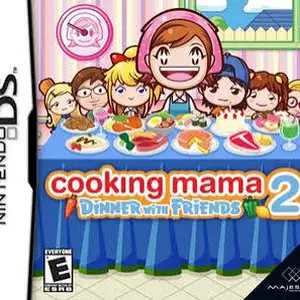
Cooking Mama 2: Dinner With Friends
About this game
Cooking Mama 2: Dinner With Friends is a casual cooking simulation game developed by Office Create and released for Nintendo DS in 2007, the sequel to Cooking Mama series. Players use the NDS stylus to follow Mama’s instructions and cook various dishes. Every cooking task such as chopping, stirring, frying, baking and plating is split into touch-based minigames. Your medal grade depends on your speed and accuracy. The game includes over 80 recipes from different countries, covering main courses, desserts and appetizers. A brand-new friend evaluation system is added, your finished dishes will be tasted and scored by friends. It supports single-card multiplayer cooking competition, and you can wirelessly send demo to other NDS consoles. You can also save photos of finished meals and decorate them with stickers. With warm cartoon art style and easy controls suitable for all ages, it is one of the most beloved casual touch simulation games on NDS.
- Release year
- 2007
- Developer
- Players
- Single player
- Supported languages
- English · 日本語
FAQ
- How can I play Cooking Mama 2: Dinner With Friends?
- You can play Cooking Mama 2: Dinner With Friends online for free right in your browser on 8BitGo. No download or emulator installation is required.
- What platform is Cooking Mama 2: Dinner With Friends?
- 8BitGo classifies this version as Nintendo DS. That describes how it runs here and may differ from the game's original release platform. You can play it directly in the browser.
- Can I save my progress in Cooking Mama 2: Dinner With Friends?
- Save support depends on how this game runs. Quick saves and cloud saves are available only when the player toolbar shows a save control; otherwise use the game's own save feature.
- Does Cooking Mama 2: Dinner With Friends work on mobile?
- It depends on the game. Check the controls on this page: games with on-screen buttons work on touch devices, while keyboard-and-mouse games are best played on desktop.
Controls
These are the default keys. Click the gamepad icon 🎮 in the player toolbar, then “Remap keys” to open the emulator’s own control settings (keyboard and gamepad, saved automatically). Gamepads are detected automatically. On phones you get on-screen buttons.
D-Pad
W S A D
A
K
B
J
X
I
Y
U
L
Q
R
E
Start
Enter
Select
Shift
Quick save
F2
Quick load
F4
You might also like
Same platform, same genre, or from the same developer
 NDS
NDSCooking Mama
 NDS
NDSPlants vs. Zombies
 NDS
NDSGrand Theft Auto: Chinatown Wars
 NDS
NDSCall of Duty: World at War
 NDS
NDSPokémon SoulSilver
 NDS
NDSPokémon HeartGold
 NDS
NDSPokémon White
 NDS
NDS