
Checking this game’s age requirement…
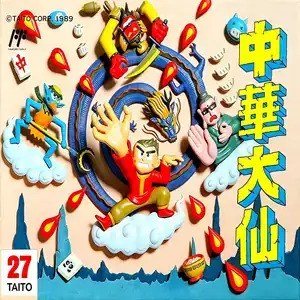
Chuka Taisen:Cloud Master
About this game
Chuuka Taisen (known overseas as Cloud Master) is a horizontal scrolling shoot 'em up developed by Taito. The original arcade version launched in 1988, and the Famicom/FC port was released in 1989. It is a mythological themed STG featuring ancient Chinese aesthetics. Players control the young immortal Michael Chen, who rides a magic cloud resembling the cloud from Journey to the West. Travel through scenic stages including Five Elements Mountain, Yellow River, Great Wall and underwater dragon palace, fighting mythical monsters, flying ramen bowls, demonic monks, pig demons, phoenix and dragon bosses. It features a unique spell shop system. After defeating mid-bosses, players can buy more than ten types of sub-weapons such as fire wheels and bombs. Power-ups upgrade your main shot, but power levels reset completely once you die, raising the challenge. It uses ink-wash inspired pixel art paired with traditional Chinese pentatonic BGM. The bullet density demands careful pattern memorization. Two-player co-op gameplay is supported. Widely included on Subor multicarts, it stands as one of the most recognizable oriental shooters on the Famicom.
- Release year
- 1989
- Developer
- Players
- Single player
- Supported languages
- 简体中文 · English
FAQ
- How can I play Chuka Taisen:Cloud Master?
- You can play Chuka Taisen:Cloud Master online for free right in your browser on 8BitGo. No download or emulator installation is required.
- What platform is Chuka Taisen:Cloud Master?
- 8BitGo classifies this version as NES (Famicom). That describes how it runs here and may differ from the game's original release platform. You can play it directly in the browser.
- Can I save my progress in Chuka Taisen:Cloud Master?
- Save support depends on how this game runs. Quick saves and cloud saves are available only when the player toolbar shows a save control; otherwise use the game's own save feature.
- Does Chuka Taisen:Cloud Master work on mobile?
- It depends on the game. Check the controls on this page: games with on-screen buttons work on touch devices, while keyboard-and-mouse games are best played on desktop.
Controls
These are the default keys. Click the gamepad icon 🎮 in the player toolbar, then “Remap keys” to open the emulator’s own control settings (keyboard and gamepad, saved automatically). Gamepads are detected automatically. On phones you get on-screen buttons.
D-Pad
W S A D
A
K
B
J
Start
Enter
Select
Shift
Quick save
F2
Quick load
F4
You might also like
Same platform, same genre, or from the same developer
 DOS
DOSBust-a-Move 2: Arcade Edition
 ARCADE
Chase H.Q.
 NES
NESSuper Mario Bros.
Contra
 NES
NESSuper Mario Bros.3
 NES
NESTeenage Mutant Ninja Turtles III: The Manhattan Project
 NES
NESCircus Charlie
 NES
NES