
Die Altersanforderung dieses Spiels wird geprüft…
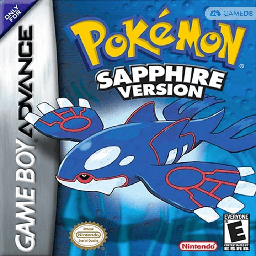
Pokémon Sapphire
Über dieses Spiel
**Pokémon Sapphire Version** is a role‑playing game developed by Game Freak and published by Nintendo. It was first released in Japan on November 21, 2002, followed by launches in other regions throughout 2003. As the Generation III title in the Pokémon franchise, it marked the series’ debut on the Game Boy Advance platform. Carrying over core gameplay from earlier installments, players control the protagonist from a top‑down perspective, with goals to defeat the Elite Four and complete the Pokédex. The title introduced numerous new features, including double battles, Pokémon Abilities, and 135 brand‑new Pokémon. Benefiting from improved GBA hardware capabilities, the game supported link‑up battles for up to four players. It also added new gameplay modes such as the Pokémon Contests to expand overall game content.
- Erscheinungsjahr
- 2002
- Entwickler
- Spieler
- Einzelspieler
- Unterstützte Sprachen
- 简体中文 · 繁體中文 · English · 日本語 · Français · Deutsch · Español · Italiano
Häufige Fragen
- Wie kann ich Pokémon Sapphire spielen?
- Du kannst Pokémon Sapphire kostenlos und online direkt in deinem Browser auf 8BitGo spielen. Es ist kein Download oder Emulator nötig.
- Für welche Plattform ist Pokémon Sapphire?
- 8BitGo ordnet diese Version als Game Boy Advance ein. Das beschreibt die Laufzeit auf dieser Website und kann von der ursprünglichen Veröffentlichungsplattform abweichen. Du kannst direkt im Browser spielen.
- Kann ich meinen Fortschritt in Pokémon Sapphire speichern?
- Die Speicherfunktion hängt von der Laufzeit des Spiels ab. Schnell- und Cloud-Speichern sind nur verfügbar, wenn die Spielerleiste eine Speicherfunktion zeigt; andernfalls nutze die Speicherfunktion des Spiels.
- Funktioniert Pokémon Sapphire auf dem Handy?
- Das hängt vom Spiel ab. Prüfe die Steuerung auf dieser Seite: Spiele mit Bildschirmtasten funktionieren per Touch, Spiele mit Tastatur und Maus am besten am Computer.
Steuerung
Das sind die Standardtasten. Klicke im Player auf das Gamepad-Symbol 🎮 und dann auf „Tasten belegen“, um die Tastenbelegung des Emulators zu öffnen (Tastatur und Gamepad, wird automatisch gespeichert). Gamepads werden automatisch erkannt. Auf dem Handy bekommst du Bildschirmtasten.
Steuerkreuz
W S A D
A
K
B
J
L
Q
R
E
Start
Enter
Select
Shift
Schnellspeichern
F2
Schnellladen
F4
Das könnte dir auch gefallen
Gleiche Plattform, gleiches Genre oder vom selben Entwickler
 GBA
GBAPokémon FireRed
 GBA
GBAPokémon Emerald
 GBA
GBAPokémon Ruby
 GBA
GBAPokémon LeafGreen
 GBC
GBCPokémon Crystal Version
 NDS
NDSPokémon White 2
 NDS
NDSPokémon Black
 GBC
GBC