
Die Altersanforderung dieses Spiels wird geprüft…
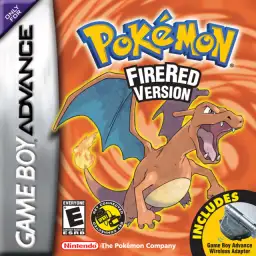
Pokémon FireRed
Über dieses Spiel
Pokémon FireRed is a classic GBA role-playing game developed by Game Freak and published by Nintendo in 2004. As an official Generation III remake of the original Pokémon Red for Game Boy, it pairs with Pokémon LeafGreen and perfectly inherits the classic Kanto-region adventure while upgrading graphics and gameplay for GBA hardware, remaining a top-tier nostalgic Pokémon game for retro game fans worldwide. The game returns to the iconic Kanto region and restores the complete original storyline. Players start their trainer journey from Pallet Town and choose one of the three classic starters, Bulbasaur, Charmander or Squirtle. Throughout the adventure, players challenge eight gym leaders, defeat the Elite Four, take on the Pokémon League and thwart the evil plans of Team Rocket to protect the peace of Kanto. While retaining all 151 original Generation I Pokémon, Pokémon FireRed upgrades pixel visuals, battle animations and scene details. It integrates complete Generation III mechanics including Pokémon Natures, Abilities and double battles, greatly enriching team building and strategic combat. The most highlight feature is the exclusive Sevii Islands post-game storyline, offering brand-new island maps, abundant side quests and end-game content that greatly extends gameplay duration. The game supports GBA wireless adapter functions, allowing players to trade and battle with Pokémon LeafGreen and Pokémon Emerald versions conveniently. The popular FireRed 386 hack enables players to catch all 386 Pokémon in single-player mode without multiplayer trading. Fully playable on all kinds of GBA emulators with smooth operation and balanced difficulty, Pokémon FireRed is still one of the most popular classic remakes in the Pokémon retro gaming community.
- Erscheinungsjahr
- 2004
- Entwickler
- Spieler
- Einzelspieler
- Unterstützte Sprachen
- 简体中文 · 繁體中文 · English · 日本語 · Français · Deutsch · Español · Italiano
Häufige Fragen
- Wie kann ich Pokémon FireRed spielen?
- Du kannst Pokémon FireRed kostenlos und online direkt in deinem Browser auf 8BitGo spielen. Es ist kein Download oder Emulator nötig.
- Für welche Plattform ist Pokémon FireRed?
- 8BitGo ordnet diese Version als Game Boy Advance ein. Das beschreibt die Laufzeit auf dieser Website und kann von der ursprünglichen Veröffentlichungsplattform abweichen. Du kannst direkt im Browser spielen.
- Kann ich meinen Fortschritt in Pokémon FireRed speichern?
- Die Speicherfunktion hängt von der Laufzeit des Spiels ab. Schnell- und Cloud-Speichern sind nur verfügbar, wenn die Spielerleiste eine Speicherfunktion zeigt; andernfalls nutze die Speicherfunktion des Spiels.
- Funktioniert Pokémon FireRed auf dem Handy?
- Das hängt vom Spiel ab. Prüfe die Steuerung auf dieser Seite: Spiele mit Bildschirmtasten funktionieren per Touch, Spiele mit Tastatur und Maus am besten am Computer.
Steuerung
Das sind die Standardtasten. Klicke im Player auf das Gamepad-Symbol 🎮 und dann auf „Tasten belegen“, um die Tastenbelegung des Emulators zu öffnen (Tastatur und Gamepad, wird automatisch gespeichert). Gamepads werden automatisch erkannt. Auf dem Handy bekommst du Bildschirmtasten.
Steuerkreuz
W S A D
A
K
B
J
L
Q
R
E
Start
Enter
Select
Shift
Schnellspeichern
F2
Schnellladen
F4
Das könnte dir auch gefallen
Gleiche Plattform, gleiches Genre oder vom selben Entwickler
 GBA
GBAPokémon Emerald
 GBA
GBAPokémon Ruby
 GBA
GBAPokémon LeafGreen
 GBC
GBCPokémon Crystal Version
 NDS
NDSPokémon White 2
 NDS
NDSPokémon Black
 GBC
GBCPokémon Silver Version
 GBA
GBA