
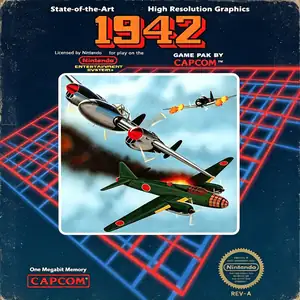
Die Altersanforderung dieses Spiels wird geprüft…
Über dieses Spiel
1942 is a classic vertical‑scroll shoot‑em‑up developed by Capcom. First released for arcades in 1984, it was ported to the Famicom / NES console in 1985, launching the well‑known 194X aerial combat game series. Set in the World War II Pacific War, players pilot a P‑38 Lightning fighter jet through 32 challenging stages, advancing toward Tokyo while fighting wave after wave of enemy aircraft. It features the iconic loop‑de‑loop evasion skill, granting brief invincibility at the cost of limited uses, acting as an early prototype for bomb mechanics in later shoot‑em‑ups抖音百科. Destroying red enemy formations drops POW power‑ups, unlocking quad machine‑guns, wingman escorts and extra lives. Alternating two‑player mode is available for high‑score competition. A landmark 80‑s arcade shooter, 1942 laid the foundation for Capcom’s shoot‑em‑up design and spawned the sequel 1943: The Battle of Midway. The NES port sold over one million copies worldwide and has been re‑released in multiple Capcom retro compilations. Today the full game including loop‑de‑loop mechanics can be played via emulators, remaining a must‑play classic among retro NES vertical shooter titles.
- Erscheinungsjahr
- 1985
- Entwickler
- Spieler
- Einzelspieler
- Unterstützte Sprachen
- 简体中文 · English · 日本語 · Español
Häufige Fragen
- Wie kann ich 1942 spielen?
- Du kannst 1942 kostenlos und online direkt in deinem Browser auf 8BitGo spielen. Es ist kein Download oder Emulator nötig.
- Für welche Plattform ist 1942?
- 8BitGo ordnet diese Version als NES (Famicom) ein. Das beschreibt die Laufzeit auf dieser Website und kann von der ursprünglichen Veröffentlichungsplattform abweichen. Du kannst direkt im Browser spielen.
- Kann ich meinen Fortschritt in 1942 speichern?
- Die Speicherfunktion hängt von der Laufzeit des Spiels ab. Schnell- und Cloud-Speichern sind nur verfügbar, wenn die Spielerleiste eine Speicherfunktion zeigt; andernfalls nutze die Speicherfunktion des Spiels.
- Funktioniert 1942 auf dem Handy?
- Das hängt vom Spiel ab. Prüfe die Steuerung auf dieser Seite: Spiele mit Bildschirmtasten funktionieren per Touch, Spiele mit Tastatur und Maus am besten am Computer.
Steuerung
Das sind die Standardtasten. Klicke im Player auf das Gamepad-Symbol 🎮 und dann auf „Tasten belegen“, um die Tastenbelegung des Emulators zu öffnen (Tastatur und Gamepad, wird automatisch gespeichert). Gamepads werden automatisch erkannt. Auf dem Handy bekommst du Bildschirmtasten.
Steuerkreuz
W S A D
A
K
B
J
Start
Enter
Select
Shift
Schnellspeichern
F2
Schnellladen
F4
Das könnte dir auch gefallen
Gleiche Plattform, gleiches Genre oder vom selben Entwickler
Cadillacs and Dinosaurs
 ARCADE
JoJo's Bizarre Adventure: Heritage for the Future
 ARCADE
Warriors of Fate
 ARCADE
Marvel Super Heroes vs Street Fighter
 ARCADE
Street Fighter Alpha 3
.webp) ARCADE
ARCADESuper Street Fighter II Turbo
 GBA
GBAPhoenix Wright: Ace Attorney
 ARCADE