
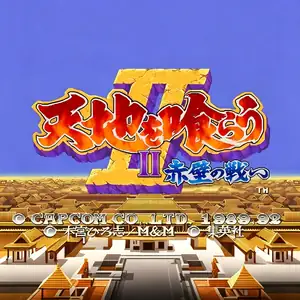
Die Altersanforderung dieses Spiels wird geprüft…
Warriors of Fate
Über dieses Spiel
Tenchi wo Kurau II: Sekiheki no Tatakai, internationally titled Warriors of Fate and widely known as Sangokushi 2 among Chinese‑speaking players, is a CPS‑1 side‑scrolling beat‑'em‑up released by Capcom in 1992. Based on Hiroshi Motomiya’s manga Tenchi wo Kurau, it is the peak sequel in the Tenchi wo Kurau franchise and one of the most legendary Three‑Kingdoms‑themed arcade games. The campaign starts from the Battle of Bowang Slope and leads through the Battle of Red Cliff, depicting Liu Bei’s generals fighting against Cao Cao’s forces. Up to three players can join co‑op gameplay, choosing from five distinct heroes: Guan Yu, Zhang Fei, Zhao Yun, Huang Zhong and Wei Yan, each with unique stats and special moves. Moving away from the mount‑focused combat of the first game, infantry‑style brawling takes center stage. The system features combos, throws, aerial grabs and health‑costing special attacks. Players can pick up swords, spears, maces and rare secret weapons such as Yitian and Holy Sword. Food items hidden inside destructible crates restore health, while horse‑mounted combat remains available. Across nine stages, players fight powerful Wei generals including Li Dian, Xiahou Dun, Xu Chu and Zhang Liao. Praised for its satisfying combat and striking manga‑style visuals, the arcade original can be experienced via MAME emulators. It was later ported to PlayStation and Sega Saturn, and remains an iconic landmark of beat‑'em‑up arcade history.
- Erscheinungsjahr
- 1992
- Entwickler
- Spieler
- 3 Spieler
- Unterstützte Sprachen
- 简体中文 · English · 日本語
Häufige Fragen
- Wie kann ich Warriors of Fate spielen?
- Du kannst Warriors of Fate kostenlos und online direkt in deinem Browser auf 8BitGo spielen. Es ist kein Download oder Emulator nötig.
- Für welche Plattform ist Warriors of Fate?
- 8BitGo ordnet diese Version als Arcade ein. Das beschreibt die Laufzeit auf dieser Website und kann von der ursprünglichen Veröffentlichungsplattform abweichen. Du kannst direkt im Browser spielen.
- Kann ich meinen Fortschritt in Warriors of Fate speichern?
- Die Speicherfunktion hängt von der Laufzeit des Spiels ab. Schnell- und Cloud-Speichern sind nur verfügbar, wenn die Spielerleiste eine Speicherfunktion zeigt; andernfalls nutze die Speicherfunktion des Spiels.
- Funktioniert Warriors of Fate auf dem Handy?
- Das hängt vom Spiel ab. Prüfe die Steuerung auf dieser Seite: Spiele mit Bildschirmtasten funktionieren per Touch, Spiele mit Tastatur und Maus am besten am Computer.
Steuerung
Das sind die Standardtasten. Jedes Arcade-Board hat unterschiedlich viele Tasten und meint Unterschiedliches damit. Oben stehen die Tasten 1–6 des Boards: auf Neo Geo (The King of Fighters und Co.) sind A/B/C/D die Tasten 1–4, Metal Slug nutzt nur 1, 2 und 4 (Schuss / Sprung / Granate), und Pac-Man gar keine. Sechs-Tasten-Prügler mit drei Schlägen und drei Tritten (etwa Street Fighter II) bekommen vom Kern ein anderes Layout: leichter Schlag U, mittlerer Schlag I, schwerer Schlag Q, leichter Tritt J, mittlerer Tritt K, schwerer Tritt E. Klicke im Player auf das Gamepad-Symbol 🎮 und dann auf „Tasten belegen“, um die Tastenbelegung des Emulators zu öffnen (Tastatur und Gamepad, wird automatisch gespeichert). Gamepads werden automatisch erkannt. Auf dem Handy bekommst du Bildschirmtasten.
Steuerkreuz
W S A D
Taste 1
J
Taste 2
K
Taste 3
U
Taste 4
I
Taste 5
E
Taste 6
Q
Münze einwerfen
V
Start
Enter
Schnellspeichern
F2
Schnellladen
F4
Das könnte dir auch gefallen
Gleiche Plattform, gleiches Genre oder vom selben Entwickler
Cadillacs and Dinosaurs
 ARCADE
JoJo's Bizarre Adventure: Heritage for the Future
 ARCADE
Marvel Super Heroes vs Street Fighter
 ARCADE
Street Fighter Alpha 3
.webp) ARCADE
ARCADESuper Street Fighter II Turbo
 GBA
GBAPhoenix Wright: Ace Attorney
 ARCADE
Street Fighter
 GB
GB