
Verifica del requisito di età del gioco…
Informazioni sul gioco
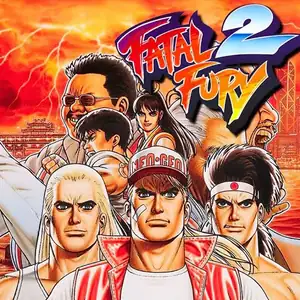
Fatal Fury 2 (Japanese: Garou Densetsu 2: Arata‑Naru Tatakai) is SNK’s 2D fighting arcade title released December 10,1992 for Neo‑Geo MVS hardware, the direct sequel to the original Fatal Fury. It marks the debut of iconic characters Mai Shiranui and Kim Kaphwan, and laid the foundation for Fatal Fury Special. The story follows Terry, Andy and Joe as they enter a tournament hosted by Wolfgang Krauser, Geese Howard’s powerful half‑brother who seizes control of South Town after Geese fakes his death. It refines the signature two‑plane battle system for foreground‑background evasion. The control scheme shifts from 3‑button to 4‑button light/heavy punch‑kick layout, and introduces the legendary Desperation Move: high‑damage reversal specials usable only when health flashes red. Eight playable fighters are available, with a boss ladder including Billy Kane, Axel Hawk, Lawrence Blood and final boss Wolfgang Krauser. Enhanced sprite art, animations and soundtrack. Widely ported to home consoles, playable via MAME arcade emulators.
- Anno di uscita
- 1992
- Sviluppatore
- Giocatori
- 2 giocatori
- Lingue supportate
- English
Domande frequenti
- Come posso giocare a Fatal Fury 2?
- Puoi giocare a Fatal Fury 2 online e gratuitamente direttamente nel tuo browser su 8BitGo. Non è richiesto alcun download né l'installazione di emulatori.
- Su quale piattaforma è Fatal Fury 2?
- 8BitGo classifica questa versione come Arcade. Questo descrive come viene eseguita qui e può differire dalla piattaforma di uscita originale. Puoi giocare direttamente nel browser.
- Posso salvare i miei progressi in Fatal Fury 2?
- Il supporto ai salvataggi dipende da come viene eseguito il gioco. Salvataggi rapidi e cloud sono disponibili solo se la barra del player mostra il relativo comando; altrimenti usa il salvataggio interno del gioco.
- Fatal Fury 2 funziona su mobile?
- Dipende dal gioco. Controlla i comandi in questa pagina: i giochi con pulsanti su schermo funzionano via touch, mentre quelli con tastiera e mouse sono più adatti al computer.
Comandi
Questi sono i tasti predefiniti. Ogni scheda arcade ha un numero di tasti diverso e attribuisce loro significati diversi. Sopra trovi i tasti da 1 a 6 della scheda: sulle Neo Geo (The King of Fighters e affini) A/B/C/D sono i tasti 1–4, Metal Slug usa solo 1, 2 e 4 (sparo / salto / granata) e Pac-Man non ne usa nessuno. I picchiaduro a sei tasti con tre pugni e tre calci (Street Fighter II e simili) ricevono dal core un altro schema: pugno debole U, pugno medio I, pugno forte Q, calcio debole J, calcio medio K, calcio forte E. Fai clic sull’icona del gamepad 🎮 nella barra del player, poi su «Rimappa i tasti» per aprire le impostazioni dei controlli dell’emulatore (tastiera e gamepad, salvate automaticamente). I gamepad vengono rilevati in automatico. Su smartphone compaiono i pulsanti a schermo.
Croce direzionale
W S A D
Tasto 1
J
Tasto 2
K
Tasto 3
U
Tasto 4
I
Tasto 5
E
Tasto 6
Q
Inserisci moneta
V
Start
Enter
Salvataggio rapido
F2
Caricamento rapido
F4
Potrebbe piacerti anche
Stessa piattaforma, stesso genere o stesso sviluppatore
The King of Fighters ’97
 ARCADE
King Of Fighters 2002
 ARCADE
Metal Slug 3
 ARCADE
The King of Fighters ’98
 ARCADE
Metal Slug: Super Vehicle-001
 ARCADE
The King of Fighters 2000
 ARCADE
The King of Fighters 2001
 ARCADE