
Verifica del requisito di età del gioco…
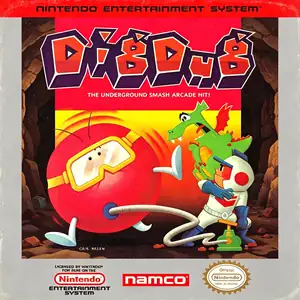
Dig Dug
Informazioni sul gioco
Dig Dug, commonly known as Digging Kid, was developed by Namco. The arcade original released in 1982 and was ported to the Famicom / NES in 1985, serving as a famous puzzle‑action arcade port of the 1980s. Players control Dig Dug, digging tunnels through underground soil layers while fighting subterranean monsters Pooka and Fygar. You can inflate foes with an air pump until they burst, or drop overhead rocks to crush enemies. Beware of monster pursuits; some creatures are able to move through solid earth. Clear every enemy to finish the stage. Extra bonus points are awarded when monsters get crushed by falling rocks. Enemies become faster and more numerous as stages progress. Alternating two‑player mode is available for high‑score competition. The NES port faithfully reproduces core arcade gameplay with adjusted visuals, retaining catchy chiptune sound effects and tense underground action. As one of Namco’s iconic 1980s titles, Dig Dug has been re‑released in multiple retro compilations. The full game can be played on modern hardware via emulators and remains a well‑known vintage puzzle‑action classic for NES fans.
- Anno di uscita
- 1985
- Sviluppatore
- Giocatori
- Giocatore singolo
- Lingue supportate
- 简体中文 · English · 日本語
Domande frequenti
- Come posso giocare a Dig Dug?
- Puoi giocare a Dig Dug online e gratuitamente direttamente nel tuo browser su 8BitGo. Non è richiesto alcun download né l'installazione di emulatori.
- Su quale piattaforma è Dig Dug?
- 8BitGo classifica questa versione come NES (Famicom). Questo descrive come viene eseguita qui e può differire dalla piattaforma di uscita originale. Puoi giocare direttamente nel browser.
- Posso salvare i miei progressi in Dig Dug?
- Il supporto ai salvataggi dipende da come viene eseguito il gioco. Salvataggi rapidi e cloud sono disponibili solo se la barra del player mostra il relativo comando; altrimenti usa il salvataggio interno del gioco.
- Dig Dug funziona su mobile?
- Dipende dal gioco. Controlla i comandi in questa pagina: i giochi con pulsanti su schermo funzionano via touch, mentre quelli con tastiera e mouse sono più adatti al computer.
Comandi
Questi sono i tasti predefiniti. Fai clic sull’icona del gamepad 🎮 nella barra del player, poi su «Rimappa i tasti» per aprire le impostazioni dei controlli dell’emulatore (tastiera e gamepad, salvate automaticamente). I gamepad vengono rilevati in automatico. Su smartphone compaiono i pulsanti a schermo.
Croce direzionale
W S A D
A
K
B
J
Start
Enter
Select
Shift
Salvataggio rapido
F2
Caricamento rapido
F4
Potrebbe piacerti anche
Stessa piattaforma, stesso genere o stesso sviluppatore
 GBA
GBATales of the World: Narikiri Dungeon 3
 NES
NESDig Dug 2
 NES
NESSuper Mario Bros.
Contra
 NES
NESSuper Mario Bros.3
 NES
NESTeenage Mutant Ninja Turtles III: The Manhattan Project
 NES
NESCircus Charlie
 NES
NES