
Comprobando el requisito de edad de este juego…
Sobre este juego
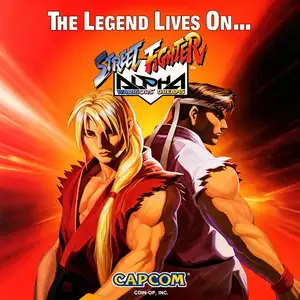
Street Fighter Alpha: Warriors' Dreams (known as Street Fighter Zero in Japan, also called Street Fighter Alpha 1) is an arcade fighting game released by Capcom in 1995 using the CPS2 arcade board. Set chronologically between the original Street Fighter and Street Fighter II, it serves as a prequel entry for the franchise. Playable fighters include returning characters Ryu, Ken, Chun-Li, Guile and Sagat, alongside new additions Adon, Charlie Nash, Rose and Dan. Akuma is available as an unlockable secret character. It introduced brand-new mechanics: Alpha Counter, air blocking and Custom Combo system. The visual art adopts a fresh hand-drawn cartoon style with softer character line art, different from the sharp aesthetics of Street Fighter II. The super gauge system is central to gameplay. Players fill the gauge to unleash Super Combos or activate Custom Combo free combo sequences. As the first title of the Street Fighter Alpha trilogy, the game redesigned character portraits and expanded the franchise backstory. It was later ported to PS, Saturn and PC platforms. Being the starting point of the Alpha series, it remains popular among retro fighting game enthusiasts.
- Año de lanzamiento
- 1995
- Desarrolladora
- Jugadores
- 2 jugadores
- Idiomas compatibles
- English
Preguntas frecuentes
- ¿Cómo puedo jugar a Street Fighter Alpha: Warriors' Dreams?
- Puedes jugar a Street Fighter Alpha: Warriors' Dreams en línea y gratis directamente en tu navegador en 8BitGo. No necesitas descargar nada ni instalar ningún emulador.
- ¿En qué plataforma es Street Fighter Alpha: Warriors' Dreams?
- 8BitGo clasifica esta versión como Arcade. Esto describe cómo se ejecuta aquí y puede diferir de la plataforma de lanzamiento original. Puedes jugar directamente en el navegador.
- ¿Puedo guardar mi progreso en Street Fighter Alpha: Warriors' Dreams?
- La posibilidad de guardar depende de cómo se ejecute el juego. El guardado rápido y en la nube solo está disponible si la barra del reproductor muestra un control de guardado; si no, usa el guardado propio del juego.
- ¿Funciona Street Fighter Alpha: Warriors' Dreams en el móvil?
- Depende del juego. Consulta los controles de esta página: los juegos con botones en pantalla funcionan con tacto, mientras que los de teclado y ratón se disfrutan mejor en un ordenador.
Controles
Estas son las teclas predeterminadas. Cada placa recreativa tiene un número de botones distinto y les da un sentido distinto. Arriba están los botones 1 a 6 de la placa: en Neo Geo (The King of Fighters y compañía) A/B/C/D son los botones 1 a 4, Metal Slug solo usa 1, 2 y 4 (disparo / salto / granada), y Pac-Man no usa ninguno. Los juegos de lucha de seis botones con tres puños y tres patadas (Street Fighter II, por ejemplo) reciben otra disposición del núcleo: puño flojo U, puño medio I, puño fuerte Q, patada floja J, patada media K, patada fuerte E. Haz clic en el icono de mando 🎮 de la barra del reproductor y luego en «Reasignar teclas» para abrir la configuración de controles del emulador (teclado y mando, se guarda automáticamente). Si conectas un mando, se detecta solo. En el teléfono aparecen botones en pantalla.
Cruceta
W S A D
Botón 1
J
Botón 2
K
Botón 3
U
Botón 4
I
Botón 5
E
Botón 6
Q
Insertar moneda
V
Start
Enter
Guardado rápido
F2
Carga rápida
F4
También te puede gustar
Misma plataforma, mismo género o de la misma desarrolladora
Cadillacs and Dinosaurs
 ARCADE
JoJo's Bizarre Adventure: Heritage for the Future
 ARCADE
Warriors of Fate
 ARCADE
Marvel Super Heroes vs Street Fighter
 ARCADE
Street Fighter Alpha 3
.webp) ARCADE
ARCADESuper Street Fighter II Turbo
 GBA
GBAPhoenix Wright: Ace Attorney
 ARCADE