
Die Altersanforderung dieses Spiels wird geprüft…
Pinball
Über dieses Spiel
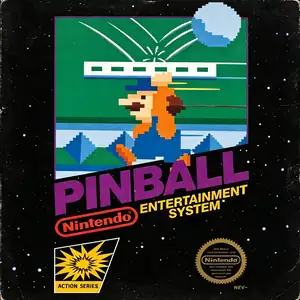
Pinball was co‑developed by Nintendo and HAL Laboratory and published by Nintendo. It launched for Famicom in 1984, and was one of the 18 launch titles for the North American NES in 1985. Adapted from Nintendo’s earlier Game & Watch pinball title, it stands as a landmark virtual pinball simulation of the 8‑bit console era. Players operate flippers to bounce the metal ball, hit targets and bumpers to earn high scores, and prevent the ball from falling out at the bottom. The playfield is split into upper and lower sections where the ball can travel back and forth. It features interactive gimmicks including seal bumpers, penguin obstacles and card‑flipping scoring mechanics. Two speed settings Mode A and Mode B are available, alongside alternating 1‑2‑player competitive gameplay for high‑score challenges. The highlight is its iconic bonus stage featuring Mario holding a moving platform to keep the ball airborne, while players attempt to rescue Pauline for massive bonus points, a charming early‑Nintendo easter egg. The game was later ported to the Famicom Disk System and included as a minigame in the Animal Crossing series. With intuitive controls and authentic arcade‑style 8‑bit chiptune audio, Pinball remains a beloved retro pinball title and can be fully experienced on modern hardware via emulators。
- Erscheinungsjahr
- 1984
- Entwickler
- ,
- Spieler
- Einzelspieler
- Unterstützte Sprachen
- 简体中文 · English
Häufige Fragen
- Wie kann ich Pinball spielen?
- Du kannst Pinball kostenlos und online direkt in deinem Browser auf 8BitGo spielen. Es ist kein Download oder Emulator nötig.
- Für welche Plattform ist Pinball?
- 8BitGo ordnet diese Version als NES (Famicom) ein. Das beschreibt die Laufzeit auf dieser Website und kann von der ursprünglichen Veröffentlichungsplattform abweichen. Du kannst direkt im Browser spielen.
- Kann ich meinen Fortschritt in Pinball speichern?
- Die Speicherfunktion hängt von der Laufzeit des Spiels ab. Schnell- und Cloud-Speichern sind nur verfügbar, wenn die Spielerleiste eine Speicherfunktion zeigt; andernfalls nutze die Speicherfunktion des Spiels.
- Funktioniert Pinball auf dem Handy?
- Das hängt vom Spiel ab. Prüfe die Steuerung auf dieser Seite: Spiele mit Bildschirmtasten funktionieren per Touch, Spiele mit Tastatur und Maus am besten am Computer.
Steuerung
Das sind die Standardtasten. Klicke im Player auf das Gamepad-Symbol 🎮 und dann auf „Tasten belegen“, um die Tastenbelegung des Emulators zu öffnen (Tastatur und Gamepad, wird automatisch gespeichert). Gamepads werden automatisch erkannt. Auf dem Handy bekommst du Bildschirmtasten.
Steuerkreuz
W S A D
A
K
B
J
Start
Enter
Select
Shift
Schnellspeichern
F2
Schnellladen
F4
Das könnte dir auch gefallen
Gleiche Plattform, gleiches Genre oder vom selben Entwickler
 GBA
GBAKirby: Nightmare in Dream Land
 GBA
GBAKirby & The Amazing Mirror
 NES
NESSuper Mario Bros.
Contra
 NES
NESSuper Mario Bros.3
 NES
NESTeenage Mutant Ninja Turtles III: The Manhattan Project
 NES
NESCircus Charlie
 NES
NES