
Die Altersanforderung dieses Spiels wird geprüft…
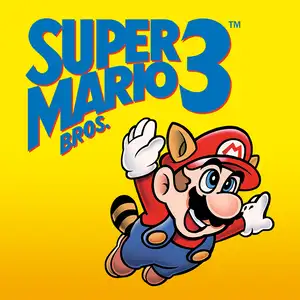
Super Mario Bros.3
Über dieses Spiel
Super Mario Bros.3 is a landmark 2D side-scrolling platform game developed by Nintendo’s Shigeru Miyamoto team, released for Famicom/NES in 1988. Bowser’s seven children, the Koopalings, steal magic wands from seven kingdoms across the Mushroom World and transform the kings into animals. Mario and Luigi embark on a journey through eight themed worlds, defeat bosses to recover wands, and finally storm Bowser’s castle to rescue Princess Peach. The game introduced the world map system, allowing players to pick routes, visit Toad Houses for bonus items and battle wandering Hammer Bros. Items can be stored in inventory and carried between stages. It added many iconic power-ups: the Super Leaf turns Mario into Raccoon Mario with tail attack and temporary flight, plus Frog Suit for better underwater control, Tanooki Suit and Hammer Mario suit. It features varied traps, giant-size stages and airship levels, with 2-player alternating gameplay and massive secrets. With upgraded graphics, level design and soundtrack, it profoundly influenced later 2D platform games and is widely regarded as one of the greatest games on FC.
- Erscheinungsjahr
- 1990
- Entwickler
- Spieler
- Einzelspieler
- Unterstützte Sprachen
- CN EN JP ES
Häufige Fragen
- Wie kann ich Super Mario Bros.3 spielen?
- Du kannst Super Mario Bros.3 kostenlos und online direkt in deinem Browser auf 8BitGo spielen. Es ist kein Download oder Emulator nötig.
- Für welche Plattform ist Super Mario Bros.3?
- Die Originalveröffentlichung von Super Mario Bros.3 erschien für die Plattform NES (Famicom). Auf 8BitGo spielst du direkt im Browser ohne zusätzliche Einrichtung.
- Kann ich meinen Fortschritt in Super Mario Bros.3 speichern?
- Ja. Die meisten Emulatoren auf 8BitGo unterstützen Schnellspeicherstände, und mit Login kannst du unterstützte Spielstände in der Cloud synchronisieren.
- Funktioniert Super Mario Bros.3 auf dem Handy?
- Ja. 8BitGo passt sich an Touchgeräte an, mit Bildschirmsteuerung oder Unterstützung für Bluetooth-Gamepads.
Steuerung
Das sind die Standardtasten. Über das Gamepad-Symbol 🎮 in der unteren Leiste des Players neu belegbar. Gamepads werden automatisch erkannt. Auf dem Handy bekommst du Bildschirmtasten.
1P
Steuerkreuz
W S A D
A
K
B
J
Turbo A
I
Turbo B
U
Start
Enter
Select
L Shift
Schnellspeichern
F2
Schnellladen
F4
2P
Steuerkreuz
Ziffernblock 8 2 4 6
A
Ziffernblock 7
B
Ziffernblock 9
Start
Ziffernblock 1
Select
Ziffernblock 3
Das NES war immer für zwei Spieler — 2P liegt auf dem Ziffernblock, NumLock spielt keine Rolle. Kein Ziffernblock? Leg 2P im 🎮-Panel auf andere Tasten.
Das könnte dir auch gefallen
Gleiche Plattform, gleiches Genre oder vom selben Entwickler
 NES
NESGomoku Narabe Renju
 HTML5
HTML5Taiko no Tatsujin:Web
 NDS
NDSPlants vs. Zombies
 FLASH
FLASHGold Miner
 FLASH
FLASHFireboy & Watergirl 4: In the Crystal Temple
 FLASH
FLASHFireboy & Watergirl 3: In the Ice Temple
 NDS
NDSPokémon SoulSilver
 NDS
NDS