
Die Altersanforderung dieses Spiels wird geprüft…
Initial D: Another Stage
Über dieses Spiel
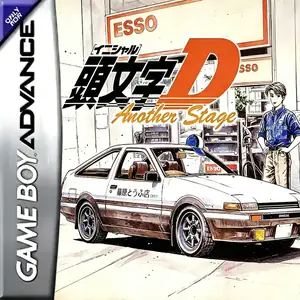
Initial D: Another Stage is the sole official Initial D title released for Game Boy Advance, developed by MTO and published by Sammy in Japan on April 26, 2002. Blending visual‑novel‑style adventure and command‑based touge racing, it is set in an alternate timeline between season 2 and season3 of Initial D anime, before Project‑D’s long‑distance road tour. Players take the role of an original high‑school driver from Gunma, buy one of eight iconic cars from the franchise and work part‑time at a gas station to cover vehicle costs. Instead of direct driving controls, races work with timed menu commands: you must pick proper braking, drift and gutter‑run techniques for every corner. Mistimed choices cause slowdown or crashes. Famous mountain passes and familiar characters such as Takumi, Ryosuke and Keisuke appear throughout the story. Originally Japanese‑only, it later received fan‑made Chinese translation and can be played via GBA emulators.
- Erscheinungsjahr
- 2002
- Entwickler
- Spieler
- Einzelspieler
- Unterstützte Sprachen
- 简体中文 · 日本語
Häufige Fragen
- Wie kann ich Initial D: Another Stage spielen?
- Du kannst Initial D: Another Stage kostenlos und online direkt in deinem Browser auf 8BitGo spielen. Es ist kein Download oder Emulator nötig.
- Für welche Plattform ist Initial D: Another Stage?
- 8BitGo ordnet diese Version als Game Boy Advance ein. Das beschreibt die Laufzeit auf dieser Website und kann von der ursprünglichen Veröffentlichungsplattform abweichen. Du kannst direkt im Browser spielen.
- Kann ich meinen Fortschritt in Initial D: Another Stage speichern?
- Die Speicherfunktion hängt von der Laufzeit des Spiels ab. Schnell- und Cloud-Speichern sind nur verfügbar, wenn die Spielerleiste eine Speicherfunktion zeigt; andernfalls nutze die Speicherfunktion des Spiels.
- Funktioniert Initial D: Another Stage auf dem Handy?
- Das hängt vom Spiel ab. Prüfe die Steuerung auf dieser Seite: Spiele mit Bildschirmtasten funktionieren per Touch, Spiele mit Tastatur und Maus am besten am Computer.
Steuerung
Das sind die Standardtasten. Klicke im Player auf das Gamepad-Symbol 🎮 und dann auf „Tasten belegen“, um die Tastenbelegung des Emulators zu öffnen (Tastatur und Gamepad, wird automatisch gespeichert). Gamepads werden automatisch erkannt. Auf dem Handy bekommst du Bildschirmtasten.
Steuerkreuz
W S A D
A
K
B
J
L
Q
R
E
Start
Enter
Select
Shift
Schnellspeichern
F2
Schnellladen
F4
Das könnte dir auch gefallen
Gleiche Plattform, gleiches Genre oder vom selben Entwickler
 GBA
GBAGT Advance 3: Pro Concept Racing
 GBA
GBACars
 GBA
GBAPokémon FireRed
 GBA
GBAPokémon Emerald
 GBA
GBAPokémon Ruby
 GBA
GBAGrand Theft Auto:Advance
 GBA
GBARhythm Heaven
 GBA
GBA