
Die Altersanforderung dieses Spiels wird geprüft…
Über dieses Spiel
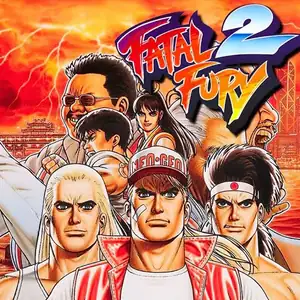
Fatal Fury 2 (Japanese: Garou Densetsu 2: Arata‑Naru Tatakai) is SNK’s 2D fighting arcade title released December 10,1992 for Neo‑Geo MVS hardware, the direct sequel to the original Fatal Fury. It marks the debut of iconic characters Mai Shiranui and Kim Kaphwan, and laid the foundation for Fatal Fury Special. The story follows Terry, Andy and Joe as they enter a tournament hosted by Wolfgang Krauser, Geese Howard’s powerful half‑brother who seizes control of South Town after Geese fakes his death. It refines the signature two‑plane battle system for foreground‑background evasion. The control scheme shifts from 3‑button to 4‑button light/heavy punch‑kick layout, and introduces the legendary Desperation Move: high‑damage reversal specials usable only when health flashes red. Eight playable fighters are available, with a boss ladder including Billy Kane, Axel Hawk, Lawrence Blood and final boss Wolfgang Krauser. Enhanced sprite art, animations and soundtrack. Widely ported to home consoles, playable via MAME arcade emulators.
- Erscheinungsjahr
- 1992
- Entwickler
- Spieler
- 2 Spieler
- Unterstützte Sprachen
- English
Häufige Fragen
- Wie kann ich Fatal Fury 2 spielen?
- Du kannst Fatal Fury 2 kostenlos und online direkt in deinem Browser auf 8BitGo spielen. Es ist kein Download oder Emulator nötig.
- Für welche Plattform ist Fatal Fury 2?
- 8BitGo ordnet diese Version als Arcade ein. Das beschreibt die Laufzeit auf dieser Website und kann von der ursprünglichen Veröffentlichungsplattform abweichen. Du kannst direkt im Browser spielen.
- Kann ich meinen Fortschritt in Fatal Fury 2 speichern?
- Die Speicherfunktion hängt von der Laufzeit des Spiels ab. Schnell- und Cloud-Speichern sind nur verfügbar, wenn die Spielerleiste eine Speicherfunktion zeigt; andernfalls nutze die Speicherfunktion des Spiels.
- Funktioniert Fatal Fury 2 auf dem Handy?
- Das hängt vom Spiel ab. Prüfe die Steuerung auf dieser Seite: Spiele mit Bildschirmtasten funktionieren per Touch, Spiele mit Tastatur und Maus am besten am Computer.
Steuerung
Das sind die Standardtasten. Jedes Arcade-Board hat unterschiedlich viele Tasten und meint Unterschiedliches damit. Oben stehen die Tasten 1–6 des Boards: auf Neo Geo (The King of Fighters und Co.) sind A/B/C/D die Tasten 1–4, Metal Slug nutzt nur 1, 2 und 4 (Schuss / Sprung / Granate), und Pac-Man gar keine. Sechs-Tasten-Prügler mit drei Schlägen und drei Tritten (etwa Street Fighter II) bekommen vom Kern ein anderes Layout: leichter Schlag U, mittlerer Schlag I, schwerer Schlag Q, leichter Tritt J, mittlerer Tritt K, schwerer Tritt E. Klicke im Player auf das Gamepad-Symbol 🎮 und dann auf „Tasten belegen“, um die Tastenbelegung des Emulators zu öffnen (Tastatur und Gamepad, wird automatisch gespeichert). Gamepads werden automatisch erkannt. Auf dem Handy bekommst du Bildschirmtasten.
Steuerkreuz
W S A D
Taste 1
J
Taste 2
K
Taste 3
U
Taste 4
I
Taste 5
E
Taste 6
Q
Münze einwerfen
V
Start
Enter
Schnellspeichern
F2
Schnellladen
F4
Das könnte dir auch gefallen
Gleiche Plattform, gleiches Genre oder vom selben Entwickler
The King of Fighters ’97
 ARCADE
King Of Fighters 2002
 ARCADE
Metal Slug 3
 ARCADE
The King of Fighters ’98
 ARCADE
Metal Slug: Super Vehicle-001
 ARCADE
The King of Fighters 2000
 ARCADE
The King of Fighters 2001
 ARCADE